
Nissan Versa (N17): Combination switch
Exploded View
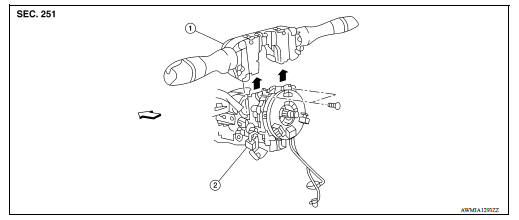
1. Combination switch 2. Combination switch harness connector  Front
Front
Removal and Installation
1. Remove the steering wheel. Refer to ST "Removal and Installation".
2. Remove the steering column cover. Refer to IP "Removal and Installation".
3. Remove the combination switch screws.
4. Disconnect the harness connector from the combination switch.
5. Remove the combination switch by lifting upward.
INSTALLATION
Installation is in the reverse order of removal.
 BCM (Body control module)
Removal and Installation CAUTION: Before replacing BCM, perform "READ CONFIGURATION" to save or print current vehicle specification. Refer to BCS "ADDITIONAL SERVICE WHEN REPLACING CONTR ...
Precautions
Precautions for Trouble Diagnosis CAUTION: Follow the instructions listed below. Failure to do this may cause damage to parts: Never apply 7.0 V or more to the measurement terminal. Use a ...
Other materials:
Shift lock system
SHIFT LOCK SYSTEM : Component Parts Location
1. Stop lamp switch 2. Shift lock release lever 3. Park position switch
4. Shift lock solenoid
Component
Function
Stop lamp switch
Stop lamp switch turns ON when brake pedal is depressed
Shift lock release lever
Ma ...
Brake drum
BRAKE DRUM : Inspection and Adjustment
INSPECTION
Appearance
Check surface of brake drum for uneven wear, cracks and serious damage.
Replace it if necessary. Refer to
BR "Removal and Installation".
Brake Drum Inner Diameter
Check inner diameter (B) of the brake drum.
(B) : Refe ...
Categories
- Manuals Home
- Nissan Versa Owners Manual
- Nissan Versa Service Manual
- Video Guides
- Questions & Answers
- External Resources
- Latest Updates
- Most Popular
- Sitemap
- Search the site
- Privacy Policy
- Contact Us

0.0212