
Nissan Versa (N17): Diagnosis system (IPDM E/R)
Diagnosis Description
AUTO ACTIVE TEST
Description
In auto active test, the IPDM E/R sends a drive signal to the following systems to check their operation.
- Front wiper (LO, HI)
- Parking lamp
- License plate lamp
- Tail lamp
- Front fog lamp
- Headlamp (LO, HI)
- A/C compressor (magnet clutch)
- Cooling fan
Operation Procedure
NOTE: Never perform auto active test in the following conditions.
- Passenger door is open
- CONSULT is connected
1. Close the hood and lift the wiper arms from the windshield. (Prevent windshield damage due to wiper operation) NOTE: When auto active test is performed with hood opened, sprinkle water on windshield beforehand.
2. Turn the ignition switch OFF.
3. Turn the ignition switch ON, and within 20 seconds, press the driver door switch 10 times. Then turn the ignition switch OFF.
4. Turn the ignition switch ON within 10 seconds. After that the horn sounds once and the auto active test starts.
5. After a series of the following operations is repeated 3 times, auto active test is completed.
NOTE:
- When auto active test has to be cancelled halfway through test, turn the ignition switch OFF.
- When auto active test is not activated, door switch may be the cause. Check door switch. Refer to DLK "Component Function Check".
Inspection in Auto Active Test
When auto active test is actuated, the following operation sequence is
repeated 3 times.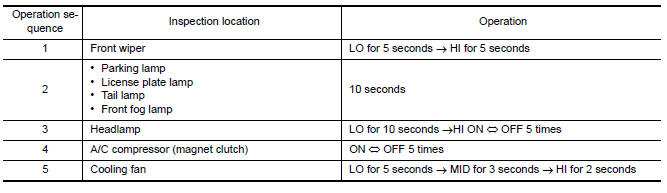
Concept of Auto Active Test
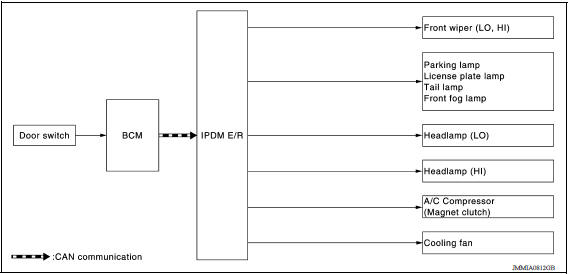
- IPDM E/R starts the auto active test with the door switch signals
transmitted by BCM via CAN communication.
Therefore, the CAN communication line between IPDM E/R and BCM is considered normal if the auto active test starts successfully.
- The auto active test facilitates troubleshooting if any systems controlled by IPDM E/R cannot be operated.
Diagnosis Chart in Auto Active Test 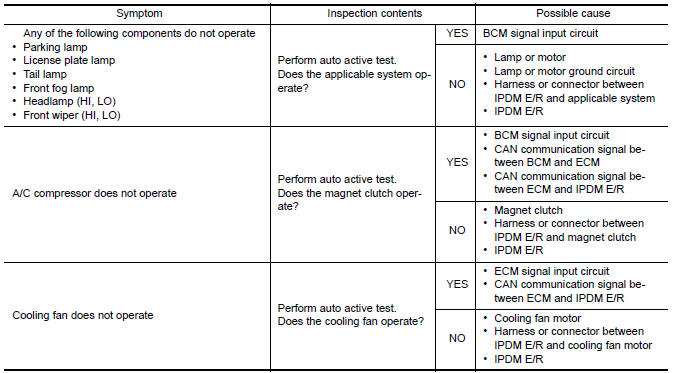
Consult Function (IPDM E/R)
APPLICATION ITEM
CONSULT performs the following functions via CAN communication with IPDM E/R. 

ECU IDENTIFICATION
The IPDM E/R part number is displayed.
SELF DIAGNOSTIC RESULT Refer to PCS "DTC Index".
DATA MONITOR 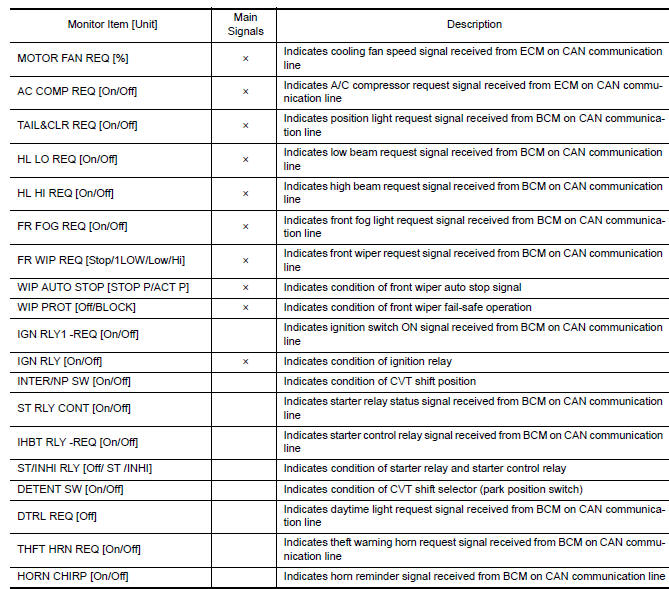
ACTIVE TEST
CAN DIAG SUPPORT MNTR
Refer to LAN "CAN Diagnostic Support Monitor".
ECU DIAGNOSIS INFORMATION
ECM, IPDM E/R, BCM
List of ECU Reference
| ECU | Reference |
| ECM | EC "Reference Value" |
| EC "Wiring Diagram" | |
| EC "Fail Safe" | |
| EC "DTC Inspection Priority Chart" | |
| EC "DTC Index" | |
| IPDM E/R | PCS "Reference Value" |
| PCS "Wiring Diagram" | |
| PCS"Fail-Safe" | |
| PCS"DTC Index" | |
| BCM | BCS "Reference Value" |
| BCS "Wiring Diagram" | |
| BCS "Fail-safe" | |
| BCS "DTC Inspection Priority Chart" | |
| BCS "DTC Index" |
WIRING DIAGRAM
NVIS
Wiring Diagram
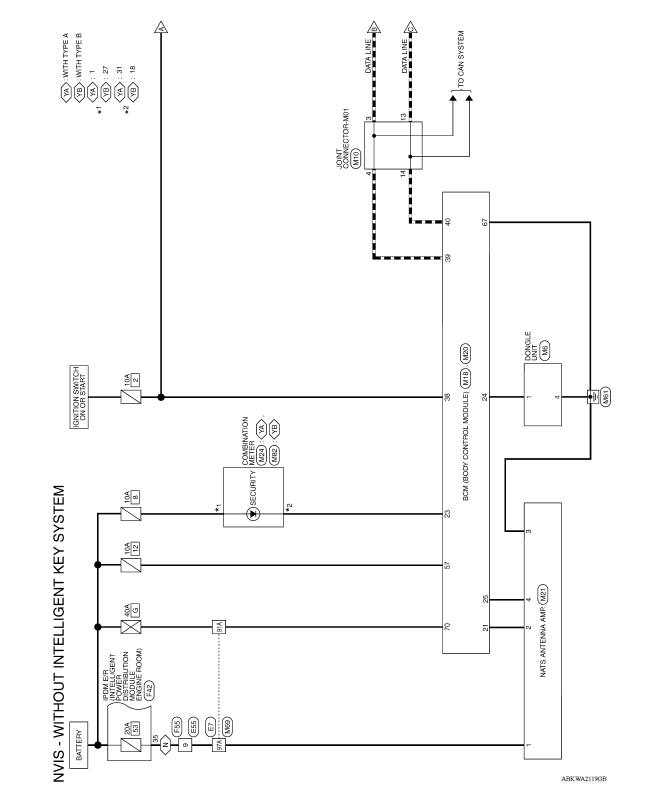
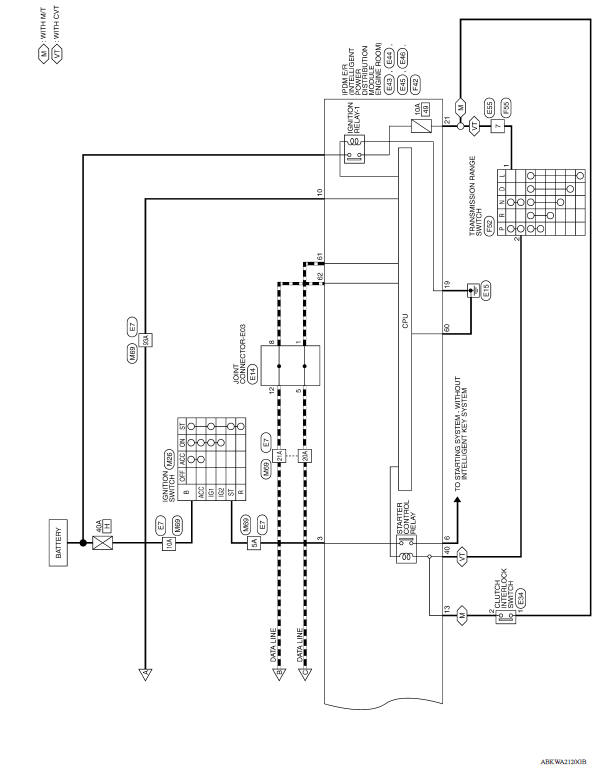
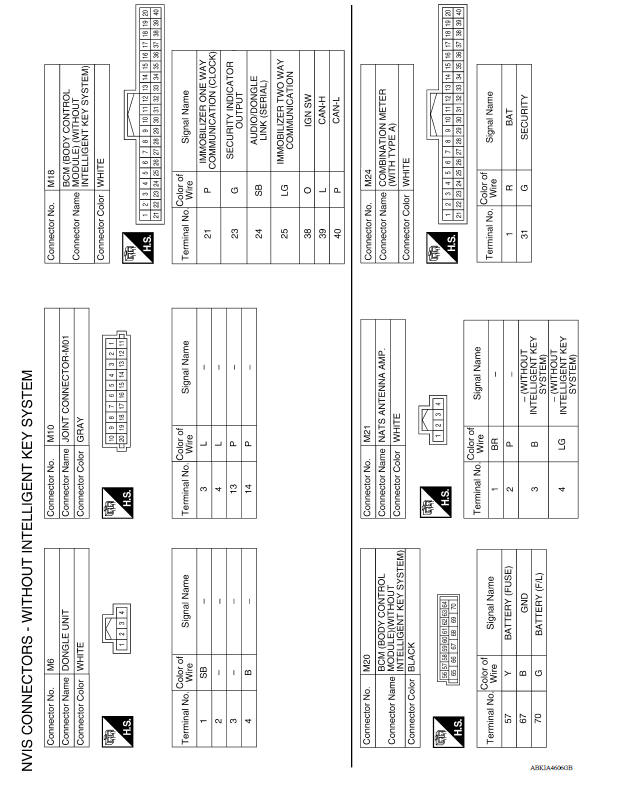
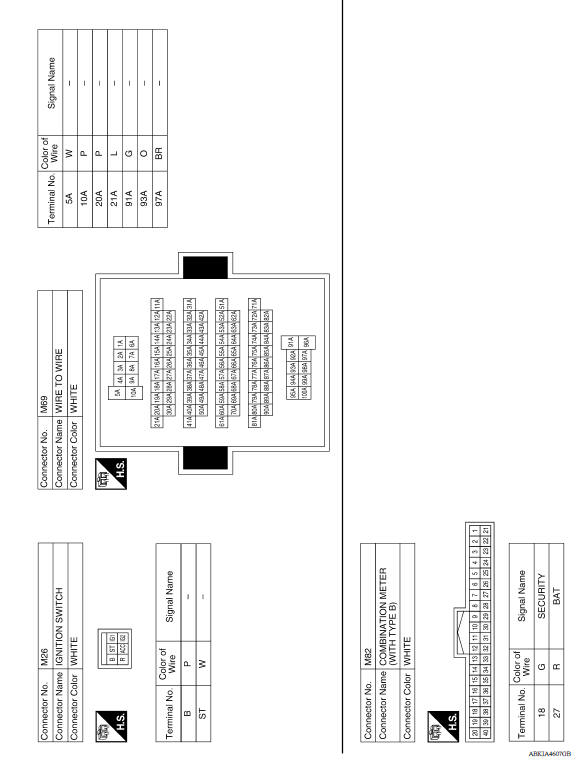
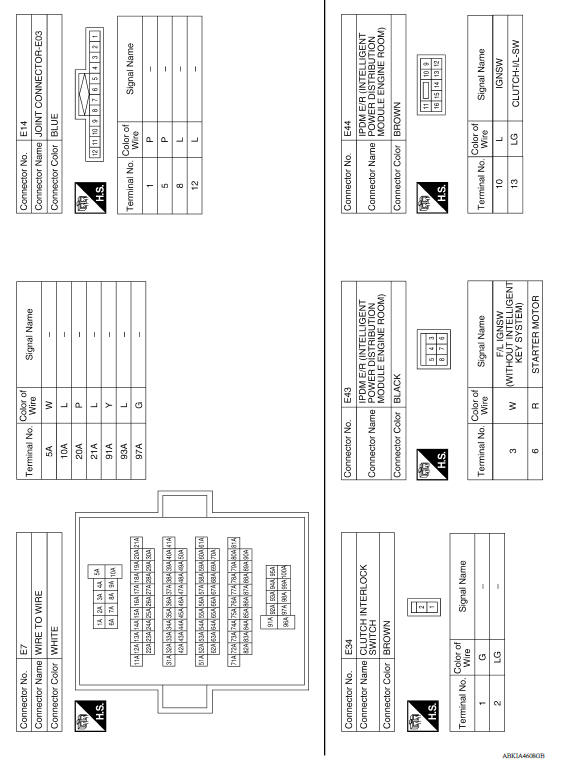
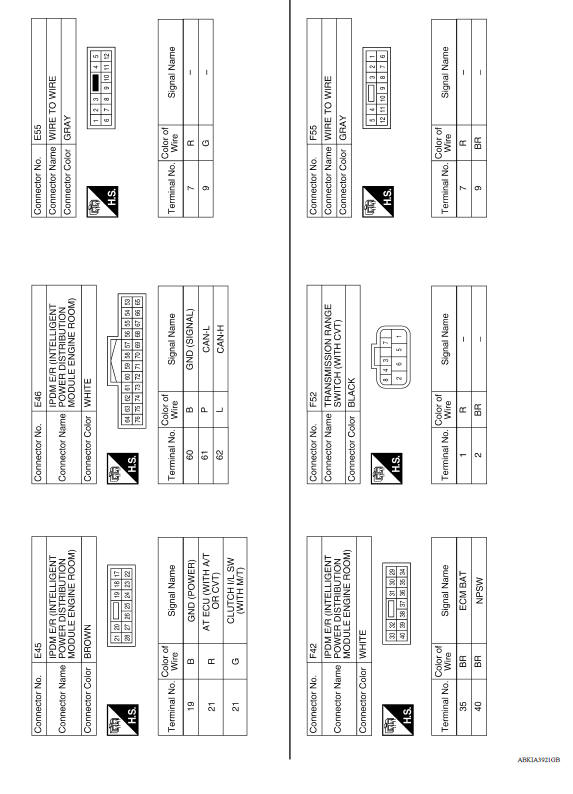
BASIC INSPECTION
 Nissan vehicle immobilizer system-NATS
NISSAN VEHICLE IMMOBILIZER SYSTEMNATS : System Diagram NISSAN VEHICLE IMMOBILIZER SYSTEMNATS : System Description INPUT/OUTPUT SIGNAL CHART BCM &n ...
Diagnosis and repair workflow
Work Flow OVERALL SEQUENCE DETAILED FLOW 1.GET INFORMATION FOR SYMPTOM Get the detailed information from the customer about the symptom (the condition and the environment when the incident/ ...
Other materials:
Intake valve timing control
Intake valve timing control : System Diagram
Intake valve timing control : system description
INPUT/OUTPUT SIGNAL CHART
Sensor
Input signal to ECM
ECM function
Actuator
Crankshaft position sensor (POS)
Engine speed*1
Piston position
Intake valve timing
con ...
Normal operating condition
Description
FUEL CUT CONTROL (AT NO LOAD AND HIGH ENGINE SPEED)
If the engine speed is above 2,400 rpm under no load (for example, the shift
lever position is neutral and
engine speed is over 2,400 rpm) fuel will be cut off after some time. The exact
time when the fuel is cut off varies
ba ...
Categories
- Manuals Home
- Nissan Versa Owners Manual
- Nissan Versa Service Manual
- Video Guides
- Questions & Answers
- External Resources
- Latest Updates
- Most Popular
- Sitemap
- Search the site
- Privacy Policy
- Contact Us

0.0083