
Nissan Versa (N17): B2616 Ignition relay circuit
DTC Logic
DTC DETECTION LOGIC

DTC CONFIRMATION PROCEDURE
1. PERFORM SELF DIAGNOSTIC RESULT
1. Turn ignition switch ON under the following conditions, and wait for at least 1 second.
- CVT selector lever is in the P (park) or N (neutral) position.
- Release brake pedal
2. Perform self diagnostic result.
Is DTC B2616 detected?
YES >> Refer to PCS "Diagnosis Procedure".
NO >> Inspection End.
Diagnosis Procedure
Regarding Wiring Diagram information, refer to PCS "Wiring Diagram".
1. CHECK IGNITION RELAY-2 POWER SUPPLY CIRCUIT
1. Turn ignition switch OFF.
2. Disconnect BCM connector M98.
3. Check continuity between ignition relay-2 connector J-3 terminal 1 and BCM
connector M98 terminal 99.
4. Check continuity between ignition relay-2 connector J-3 terminal 1 and
ground.
Is the inspection result normal?
YES >> GO TO 2.
NO >> Repair or replace harness or connectors.
2. CHECK IGNITION RELAY-2 GROUND CIRCUIT
1. Check continuity between ignition relay-2 connector J-3 terminal 2 and
ground.
Is the inspection result normal?
YES >> GO TO 3.
NO >> Repair or replace harness or connectors.
3. CHECK IGNITION RELAY-2
Perform the relay component inspection. Refer to PCS "Component Inspection".
Is the inspection result normal?
YES >> GO TO 4.
NO >> Replace ignition relay-2.
4. CHECK IGNITION RELAY-2 POWER SUPPLY (BCM)
Check voltage between BCM connector M98 terminal 99 and ground.
Is the inspection result normal?
YES >> Refer to GI "Intermittent Incident".
NO >> Replace BCM. Refer to BCS "Removal and Installation".
Component Inspection
1.CHECK IGNITION RELAY
1. Turn ignition switch OFF.
2. Remove ignition relay.
3. Check the continuity between ignition relay terminals.

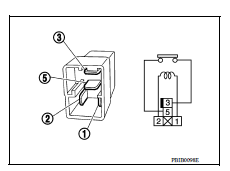
Is the inspection result normal?
YES >> Inspection End.
NO >> Replace ignition relay
 B2615 Blower relay circuit
Other materials:
Idle air volume learning
Description
Idle Air Volume Learning is a function of ECM to learn the idle air volume
that keeps each engine idle speed
within the specific range. It must be performed under any of the following
conditions:
Each time electric throttle control actuator or ECM is replaced.
Idle speed or ...
IGN OFF Interlock door unlock
function does not operate
Diagnosis Procedure
1.CHECK AUTOMATIC LOCK/UNLOCK SELECT SETTING IN WORK SUPPORT
Select DOOR LOCK of BCM using CONSULT.
Select AUTOMATIC LOCK/UNLOCK SELECT in WORK SUPPORT mode.
Check AUTOMATIC LOCK/UNLOCK SELECT setting in WORK SUPPORT.
Refer to BCS "DOOR LOCK : CONSULT Function ...
Categories
- Manuals Home
- Nissan Versa Owners Manual
- Nissan Versa Service Manual
- Video Guides
- Questions & Answers
- External Resources
- Latest Updates
- Most Popular
- Sitemap
- Search the site
- Privacy Policy
- Contact Us

0.0057