
Nissan Versa (N17): Trunk lid opener switch
Component Function Check
1.CHECK FUNCTION
- Select TRUNK of BCM using CONSULT.
- Select TR/BD OPEN SW in DATA MONITOR mode.
- Check that the function operates normally according to the following
conditions.

Is the inspection result normal?
YES >> Trunk lid switch is OK.
NO >> Refer to DLK "Diagnosis Procedure".
Diagnosis Procedure
Regarding Wiring Diagram information, refer to DLK "TRUNK LID OPENER SYSTEM : Wiring Diagram".
1.CHECK TRUNK LID OPENER INPUT SIGNAL
- Turn ignition switch OFF.
- Disconnect trunk lid switch connector.
- Check signal between trunk lid switch harness connector and ground using
oscilloscope.
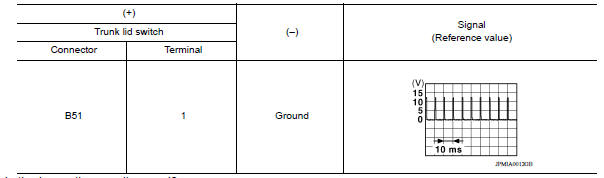
Is the inspection result normal?
YES >> GO TO 3.
NO >> GO TO 2.
2.CHECK TRUNK LID OPENER SWITCH CIRCUIT
- Disconnect BCM connector.
- Check continuity between BCM harness connector and trunk lid switch
harness connector.

- Check continuity between BCM harness connector and ground.

Is the inspection result normal?
YES >> Replace BCM. Refer to BCS "Removal and Installation".
NO >> Repair or replace harness.
3.CHECK TRUNK LID SWITCH GROUND CIRCUIT
Check continuity between trunk lid switch harness connector and ground.

Is the inspection result normal?
YES >> GO TO 4.
NO >> Repair or replace harness.
4.CHECK TRUNK LID SWITCH
Refer to DLK "Component Function Check".
Is the inspection result normal?
YES >> GO TO 5.
NO >> Replace trunk lid switch.
5.CHECK INTERMITTENT INCIDENT
Refer to GI "Intermittent Incident".
>> Inspection End.
Component Inspection
1.CHECK TRUNK LID SWITCH
- Turn ignition switch OFF.
- Disconnect trunk lid switch connector.
- Check continuity between trunk lid switch terminals.

Is the inspection result normal?
YES >> Inspection End.
NO >> Replace trunk lid switch.
 Trunk lid opener actuator
Component Function Check 1.CHECK FUNCTION Select INTELLIGENT KEY of BCM using CONSULT. Select TRUNK/GLASS HATCH in ACTIVE TEST mode. Touch OPEN to check that it works normally. Is the insp ...
Trunk lamp switch
Description Detects trunk open/close condition. Component Function Check 1.CHECK FUNCTION With CONSULT Check TRNK/HAT MNTR in Data Monitor mode with CONSULT. Is the inspection ...
Other materials:
Malfunction indicator lamp
Component Function Check
1.CHECK MIL FUNCTION
Turn ignition switch ON.
Make sure that MIL lights up.
Is the inspection result normal?
YES >> INSPECTION END
NO >> Go to EC, "Diagnosis Procedure".
Diagnosis Procedure
1.CHECK DTC
Check that DTC UXXXX is not display ...
EVAP canister filter
Exploded View
1. EVAP canister vent control valve hose 2. Canister drain hose 3. EVAP
canister filter
Front
Removal and Installation
REMOVAL
Remove the EVAP canister protector cover.
Disconnect EVAP canister vent control valve hose from EVAP canister
filter.
Disconnect caniste ...
Categories
- Manuals Home
- Nissan Versa Owners Manual
- Nissan Versa Service Manual
- Video Guides
- Questions & Answers
- External Resources
- Latest Updates
- Most Popular
- Sitemap
- Search the site
- Privacy Policy
- Contact Us

0.0157