
Nissan Versa (N17): Diagnosis and repair work flow
Work Flow
OVERALL SEQUENCE
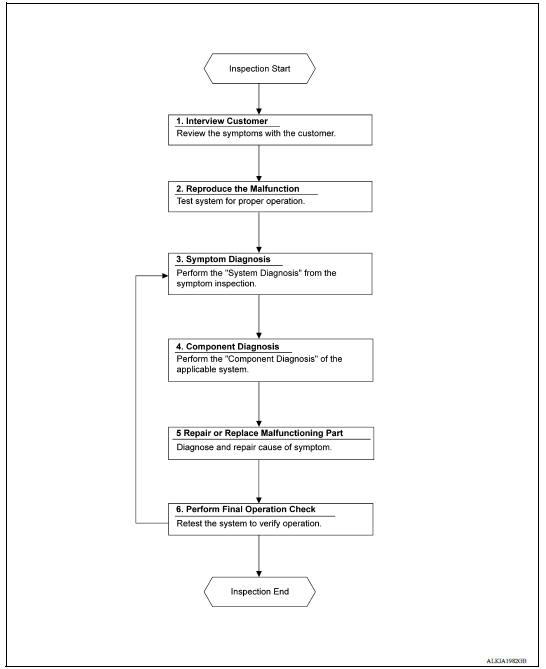
DETAILED FLOW
1. OBTAIN INFORMATION ABOUT SYMPTOM
Interview the customer to obtain as much information as possible about the conditions and environment under which the malfunction occurred.
>> GO TO 2
2. REPRODUCE THE MALFUNCTION INFORMATION
Check the malfunction on the vehicle that the customer describes.
Inspect the relation of the symptoms and the condition when the symptoms occur.
>> GO TO 3
3. IDENTIFY THE MALFUNCTIONING SYSTEM WITH "SYMPTOM DIAGNOSIS"
Use "Symptom diagnosis" from the symptom inspection result in step 2 and then identify where to start performing the diagnosis based on possible causes and symptoms.
>> GO TO 4
4. PERFORM THE COMPONENT DIAGNOSIS OF THE APPLICABLE SYSTEM
Perform the diagnosis with "Component diagnosis" of the applicable system.
>> GO TO 5
5. REPAIR OR REPLACE THE MALFUNCTIONING PARTS
Repair or replace the specified malfunctioning parts.
>> GO TO 6
6. FINAL CHECK
Check that malfunctions are not reproduced when obtaining the malfunction information from the customer, referring to the symptom inspection result in step 2.
Are the malfunctions corrected?
YES >> Inspection End.
NO >> GO TO 3
DTC/CIRCUIT DIAGNOSIS
 System
System Diagram System Description BASIC OPERATION Power window system is activated by power window switch when ignition switch turns ON. Power window main switch opens/closes all door ...

Other materials:
PRECAUTIONS
Precaution for Supplemental Restraint System
(SRS) "AIR BAG" and "SEAT BELT PRE-TENSIONER"
The Supplemental Restraint System such as "AIR BAG" and "SEAT BELT PRE-TENSIONER",
used along
with a front seat belt, helps to reduce the risk or severity of injury to the
driver and ...
Diagnosis system (BCM)
COMMON ITEM
COMMON ITEM : CONSULT Function (BCM -
COMMON ITEM)
APPLICATION ITEM
CONSULT performs the following functions via CAN communication with BCM.
SYSTEM APPLICATION
BCM can perform the following functions.
DOOR LOCK
DOOR LOCK : CONSULT Function (BCM -
DOOR LOCK)
DATA MONIT ...
Categories
- Manuals Home
- Nissan Versa Owners Manual
- Nissan Versa Service Manual
- Video Guides
- Questions & Answers
- External Resources
- Latest Updates
- Most Popular
- Sitemap
- Search the site
- Privacy Policy
- Contact Us

0.0087