
Nissan Versa (N17): Diagnosis and repair workflow
Work Flow
OVERALL SEQUENCE
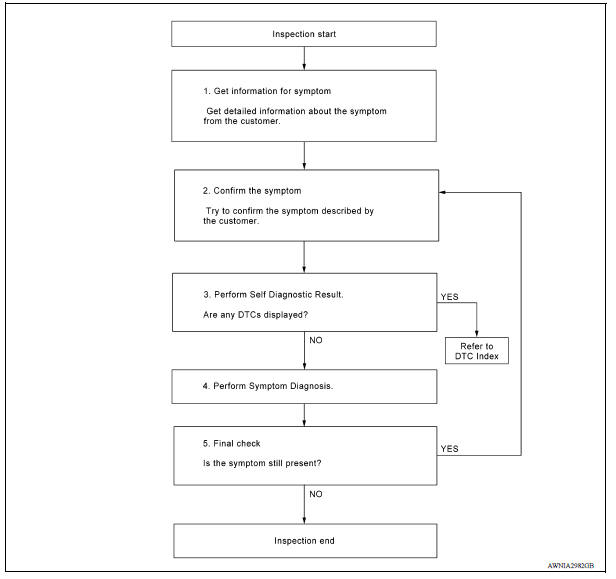
DETAILED FLOW
1.GET INFORMATION FOR SYMPTOM
Get detailed information from the customer about the symptom (the condition and the environment when the incident/malfunction occurred).
>> GO TO 2.
2.CONFIRM THE SYMPTOM
Try to confirm the symptom described by the customer. Verify relation between the symptom and the condition when the symptom is detected.
>> GO TO 3.
3.PERFORM SELF DIAGNOSTIC RESULT
1. Turn ignition switch ON and wait for 2 seconds or more.
2. Perform Self Diagnostic Result for MULTI AV.
Are any DTCs displayed?
YES >> Refer to AV "DTC Index".
NO >> GO TO 4.
4.PERFORM SYMPTOM DIAGNOSIS
Refer to AV "Symptom Table".
>> GO TO 5
5.FINAL CHECK
Refer to symptom described by the customer in step 1.
Is the symptom still present?
YES >> GO TO 2
NO >> Inspection End.
 Diagnosis system (AV Control unit)
Description The AV control unit on board diagnosis performs the functions listed in the table below: Perform CONSULT diagnosis if the AV control unit on board diagnosis does not start or t ...

Other materials:
Drive belt idler pulley
Exploded View
1. Generator bracket 2. Center shaft 3. Spacer
4. Adjusting bolt 5. Washer 6. Idler pulley
7. Plate
Removal and Installation
REMOVAL
Remove the fender protector (RH).
Remove the air duct inlet assembly.
Remove drive belt.
Remove the lock nut, and then remove the pl ...
Rear oil seal
REAR OIL SEAL : Removal and Installation
REMOVAL
Remove transaxle assembly.
Remove clutch cover and clutch disk (M/T models).
Remove flywheel (M/T models) or drive plate (A/T or CVT models).
Remove rear oil seal with a suitable tool.
CAUTION:
Be careful not to damage crankshaft an ...
Categories
- Manuals Home
- Nissan Versa Owners Manual
- Nissan Versa Service Manual
- Video Guides
- Questions & Answers
- External Resources
- Latest Updates
- Most Popular
- Sitemap
- Search the site
- Privacy Policy
- Contact Us

0.0147