
Nissan Versa (N17): B2602 Shift position
DTC Logic
DTC DETECTION LOGIC
NOTE:
- If DTC B2602 is displayed with DTC U1000, first perform the trouble diagnosis for DTC U1000. Refer to BCS "DTC Logic".
- If DTC B2602 is displayed with DTC U1010, first perform the trouble
diagnosis for DTC U1010. Refer to
BCS "DTC Logic".
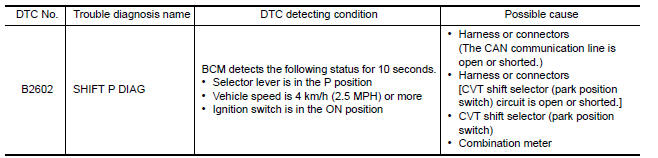
DTC CONFIRMATION PROCEDURE
1.PERFORM DTC CONFIRMATION PROCEDURE
1. Start engine.
2. Drive vehicle at a speed of 4 km/h (2.5 MPH) or more for 10 seconds or more.
3. Check DTC in Self Diagnostic Result mode of BCM using CONSULT.
Is DTC detected?
YES >> Go to SEC "Diagnosis Procedure".
NO >> Inspection End.
Diagnosis Procedure
Regarding Wiring Diagram information, refer to SEC "Wiring Diagram".
1.CHECK DTC OF ABS ACTUATOR AND ELECTRIC UNIT (CONTROL UNIT)
Check DTC in Self Diagnostic Result mode of ABS using CONSULT.
Is DTC detected?
YES >> Perform the trouble diagnosis related to the detected DTC. Refer to BRC "DTC Index".
NO >> GO TO 2.
2.CHECK DTC OF COMBINATION METER
Check DTC in Self Diagnostic Result mode of METER/M&A using CONSULT.
Is DTC detected?
YES >> Perform the trouble diagnosis related to the detected DTC. Refer to MWI "DTC Index".
NO >> GO TO 3.
3.CHECK CVT SHIFT SELECTOR POWER SUPPLY
1. Turn ignition switch OFF.
2. Disconnect CVT shift selector (park position switch) connector.
3. Check voltage between CVT shift selector (park position switch) harness
connector and ground. 
Is the inspection result normal?
YES >> GO TO 6.
NO >> GO TO 4.
4.CHECK CVT SHIFT SELECTOR POWER SUPPLY CIRCUIT
1. Disconnect BCM connector.
2. Check continuity between CVT shift selector (park position switch) harness
connector and BCM harness
connector. 
3. Check continuity between CVT shift selector (park position switch) harness
connector and ground.
Is the inspection result normal?
YES >> GO TO 5.
NO >> Repair or replace harness.
5.REPLACE BCM
1. Replace BCM. Refer to BCS "Removal and Installation".
2. Perform initialization of BCM and registration of all Intelligent Keys using CONSULT.
>> Inspection End.
6.CHECK CVT SHIFT SELECTOR CIRCUIT
1. Disconnect BCM connector and IPDM E/R connector.
2. Check continuity between CVT shift selector (park position switch) harness
connector and BCM harness
connector. 
3. Check continuity between CVT shift selector (park position switch) harness
connector and ground.
Is the inspection result normal?
YES >> GO TO 7.
NO >> Repair or replace harness.
7.CHECK CVT SHIFT SELECTOR (PARK POSITION SWITCH)
Refer to SEC "Component Inspection".
Is the inspection result normal?
YES >> GO TO 8.
NO >> Replace CVT shift selector. Refer to TM "Removal and Installation".
8.CHECK INTERMITTENT INCIDENT
Refer to GI "Intermittent Incident".
>> Inspection End.
Component Inspection
1.CHECK CVT SHIFT SELECTOR (PARK POSITION SWITCH)
1. Turn ignition switch OFF.
2. Disconnect CVT shift selector connector.
3. Check continuity between CVT shift selector (park position switch)
terminals. 
Is the inspection result normal?
YES >> Inspection End.
NO >> Replace CVT shift selector. Refer to TM "Removal and Installation".
 B2601 Shift position
Other materials:
Cold weather driving
Freeing a frozen door lock
To prevent a door lock from freezing, apply deicer
through the key hole. If the lock becomes
frozen, heat the key before inserting it into the key
hole, or use the remote keyless entry key fob or
the NISSAN Intelligent Key.
Antifreeze
In the winter when it is antic ...
If your vehicle overheats
If your vehicle is overheating (indicated by an
extremely high temperature gauge reading (if so
equipped), a red high temperature warning light
(if so equipped) ), or if you feel a
lack of
engine power, detect abnormal noise, etc. take
the following steps.
WARNING
Do not continue to driv ...
Categories
- Manuals Home
- Nissan Versa Owners Manual
- Nissan Versa Service Manual
- Video Guides
- Questions & Answers
- External Resources
- Latest Updates
- Most Popular
- Sitemap
- Search the site
- Privacy Policy
- Contact Us

0.0055