
Nissan Versa (N17): B210F Shift position/clutch interlock switch
DTC Logic
DTC DETECTION LOGIC
NOTE:
If DTC B210F is displayed with DTC U1000, first perform the trouble diagnosis
for DTC U1000. Refer to BCS "DTC Logic". 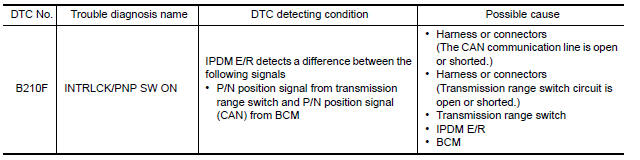
DTC CONFIRMATION PROCEDURE
1.PERFORM DTC CONFIRMATION PROCEDURE
1. Shift selector lever to the P position.
2. Turn ignition switch ON and wait 1 second or more.
3. Shift selector lever to the N position and wait 1 second or more.
4. Shift selector lever to the position other than P and N, and wait 1 second or more.
5. Check DTC in Self Diagnostic Result mode of IPDM E/R using CONSULT.
Is DTC detected?
YES >> Go to SEC "Diagnosis Procedure".
NO >> Inspection End.
Diagnosis Procedure
Regarding Wiring Diagram information, refer to SEC "Wiring Diagram".
1.CHECK DTC OF BCM
Check DTC in Self Diagnostic Result mode of BCM using CONSULT.
Is DTC detected?
YES >> Perform the trouble diagnosis related to the detected DTC. Refer to BCS "DTC Index".
NO >> GO TO 2.
2.CHECK IPDM E/R SIGNAL CIRCUIT OPEN AND SHORT
1. Turn ignition switch OFF.
2. Disconnect IPDM E/R connector.
3. Disconnect transmission range switch connector.
4. Check continuity between IPDM E/R harness connector and transmission range
switch harness connector.
5. Check continuity between IPDM E/R harness connector and ground.
Is the inspection result normal?
YES >> Replace IPDM E/R. Refer to PCS "Removal and Installation".
NO >> Repair or replace harness.
 B210E Starter relay
Other materials:
Timing chain
Exploded View
1. Timing chain slack guide 2. Timing chain tensioner 3. Camshaft sprocket
(EXH)
4. Camshaft sprocket (INT) 5. Plug 6. Front oil seal
7. Crankshaft pulley 8. Crankshaft pulley bolt 9. Front cover
10. Crankshaft sprocket 11. Crankshaft sprocket key 12. Oil pump sprocket
13. O ...
Combination meter buzzer
Component Function Check
1.CHECK FUNCTION
Select INTELLIGENT KEY of BCM using CONSULT.
Select INSIDE BUZZER in ACTIVE TEST mode.
Touch Key, Knob or Take Out to check that it works normally.
Is the inspection result normal?
Yes >> Combination meter buzzer is OK.
No >> Refer ...
Categories
- Manuals Home
- Nissan Versa Owners Manual
- Nissan Versa Service Manual
- Video Guides
- Questions & Answers
- External Resources
- Latest Updates
- Most Popular
- Sitemap
- Search the site
- Privacy Policy
- Contact Us

0.0084