
Nissan Versa (N17): Front door speaker
Removal and Installation
REMOVAL
1. Remove the front door finisher. Refer to INT "Removal and Installation".
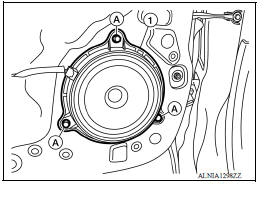
2. Remove the front door speaker screws (A).
3. Disconnect the harness connector from front door speaker (1) and remove.
INSTALLATION
Installation is in the reverse order of removal.
 USB Connector
Removal and Installation REMOVAL 1. Remove the center console assembly. Refer to IP "Removal and Installation". 2. Release the pawl from the back of the center console to remove the ...
Rear door speaker
Removal and Installation REMOVAL 1. Remove the rear door finisher. Refer to INT "Removal and Installation". 2. Remove the rear door speaker screws (A). 3. Disconnect the harness connec ...
Other materials:
Front
FRONT : Exploded View
1. Master cylinder brake pipe assembly
(front)
2. Master cylinder brake pipe assembly
(rear)
3. ABS actuator to connector brake
pipe assembly (RH)
4. ABS actuator to connector brake
pipe assembly (LH)
5. Brake pipe connector 6. Brake pipe assembly (RH front)
7. B ...
Diagnosis and repair workflow
Workflow
OVERALL SEQUENCE
DETAILED FLOW
1.INTERVIEW CUSTOMER
Interview the customer to obtain as much information as possible about the
conditions and environment under
which the malfunction occurred.
>> GO TO 2.
2.SYMPTOM CHECK
Verify symptoms.
>> GO TO 3.
3.CHECK FOR DT ...
Categories
- Manuals Home
- Nissan Versa Owners Manual
- Nissan Versa Service Manual
- Video Guides
- Questions & Answers
- External Resources
- Latest Updates
- Most Popular
- Sitemap
- Search the site
- Privacy Policy
- Contact Us

0.0095