
Nissan Versa (N17): USB Connector
Removal and Installation
REMOVAL
1. Remove the center console assembly. Refer to IP "Removal and Installation".
2. Release the pawl from the back of the center console to remove the USB harness connector (1) using a suitable tool.
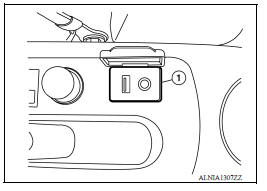
3. Disconnect the harness connector from the USB connector and remove.
INSTALLATION
Installation is in the reverse order of removal.
 AV Control unit
Removal and Installation REMOVAL 1. Remove cluster lid C. Refer to IP "Removal and Installation". 2. Remove the audio unit screws (A). 3. Pull the audio unit (1) out. 4. Disconnect the ...
Front door speaker
Removal and Installation REMOVAL 1. Remove the front door finisher. Refer to INT "Removal and Installation". 2. Remove the front door speaker screws (A). 3. Disconnect the harness connec ...
Other materials:
Transmitter wake up operation
Description
This procedure must be performed after replacement of a transmitter or the
BCM, or rotation of the wheels.
Work Procedure
NOTE:
This procedure must be done after replacement of a TPMS transmitter or BCM. New
replacement transmitters
are provided "asleep" and must first ...
Unexpected pedal reaction
Diagnosis Procedure
1.CHECK BRAKE PEDAL STROKE
Check brake pedal stroke. Refer to BR "Inspection and Adjustment".
Is the stroke too big?
YES >>
Bleed air from brake line and hose. Refer to BR "Bleeding Brake System".
Check brake pedal, brake booster, and master cy ...
Categories
- Manuals Home
- Nissan Versa Owners Manual
- Nissan Versa Service Manual
- Video Guides
- Questions & Answers
- External Resources
- Latest Updates
- Most Popular
- Sitemap
- Search the site
- Privacy Policy
- Contact Us

0.0096