
Nissan Versa (N17): Vents
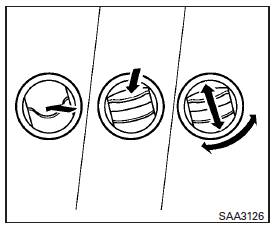
Side vents
Adjust the air flow direction of the vents by opening, closing or rotating.
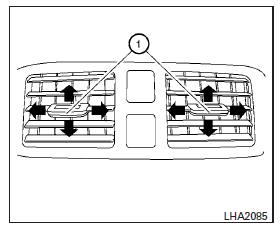
Center vents
Adjust the air flow direction of the vents by moving the slide as indicated 1 .
 RearView Monitor (if so equipped)
1. CAMERA button (models with navigation) WARNING Failure to follow the warnings and instructions for proper use of the Rear- View Monitor system could result in serious injury or death ...
Heater and Air Conditioner (manual)
WARNING The air conditioner cooling function operates only when the engine is running. Do not leave children or adults who would normally require the assistance of others alone in your veh ...
Other materials:
Service data and specifications
(sds)
General Specification
GENERAL SPECIFICATIONS
Engine type
HR16DE
Cylinder arrangement
Inline 4
Displacement &nbs ...
P0720 Output speed sensor
DTC Logic
DTC DETECTION LOGIC
DTC
Trouble diagnosis name
DTC detection condition
Possible causes
P0720
Output Speed Sensor Circuit
Under the following diagnosis
conditions, the output speed
sensor value is less than 100
rpm continuously for 5 seconds
or ...
Categories
- Manuals Home
- Nissan Versa Owners Manual
- Nissan Versa Service Manual
- Video Guides
- Questions & Answers
- External Resources
- Latest Updates
- Most Popular
- Sitemap
- Search the site
- Privacy Policy
- Contact Us

0.0102