
Nissan Versa (N17): Air pressure monitor
AIR PRESSURE MONITOR : CONSULT Function (BCM - AIR PRESSURE MONITOR)
NOTE: The Signal Tech II Tool (J-50190) can be used to perform the following functions. Refer to the Signal Tech II User Guide for additional information.
- Activate and display TPMS transmitter IDs
- Display tire pressure reported by the TPMS transmitter
- Read TPMS DTCs
- Register TPMS transmitter IDs
- Test remote keyless entry keyfob relative signal strength
SELF DIAGNOSTIC RESULT
NOTE: Before performing self diagnostic result, be sure to register the ID, or else the actual malfunction may be different from that displayed on CONSULT.
Refer to BCS "DTC Index".
DATA MONITOR
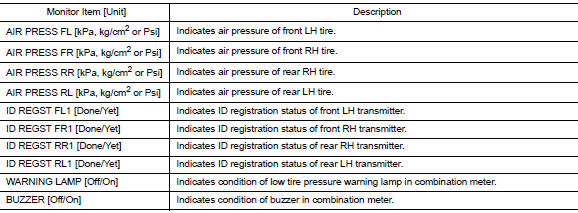
ACTIVE TEST

WORK SUPPORT
| Support Item | Description |
| ID READ | The registered ID number is displayed. |
| ID REGIST | Refer to WT "Description". |
ECU DIAGNOSIS INFORMATION
BCM
List of ECU Reference
| ECU | Reference |
| BCM (with Intelligent Key system) | BCS "Reference Value" |
| BCS "Fail-safe" | |
| BCS "DTC Inspection Priority Chart" | |
| BCS "DTC Index" | |
| BCM (without Intelligent Key system) | BCS "Reference Value" |
| BCS "Fail-safe" | |
| BCS "DTC Inspection Priority Chart" | |
| BCS "DTC Index" |
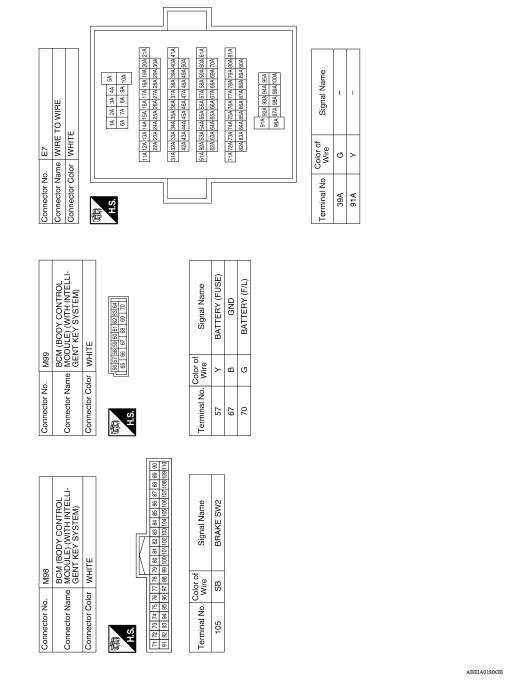
WIRING DIAGRAM
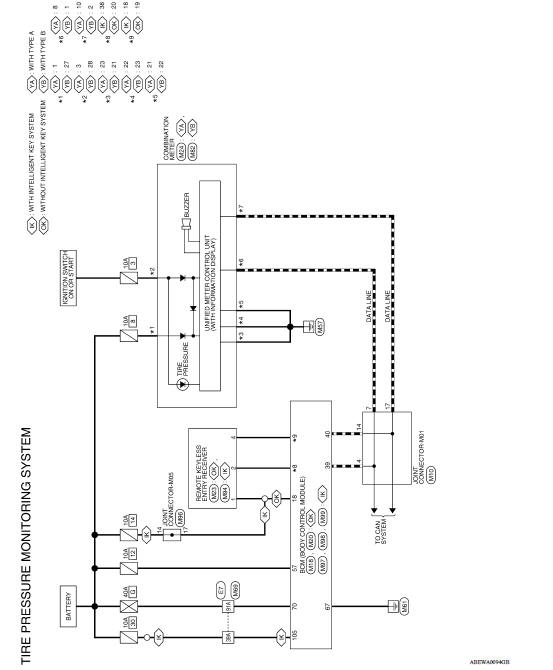
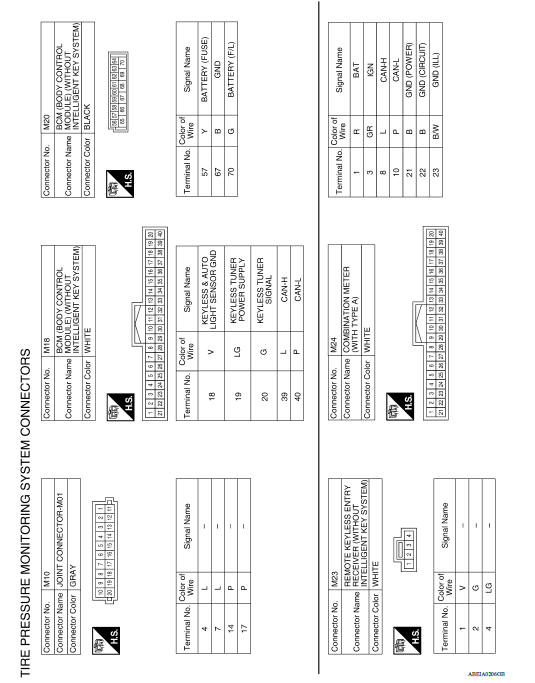
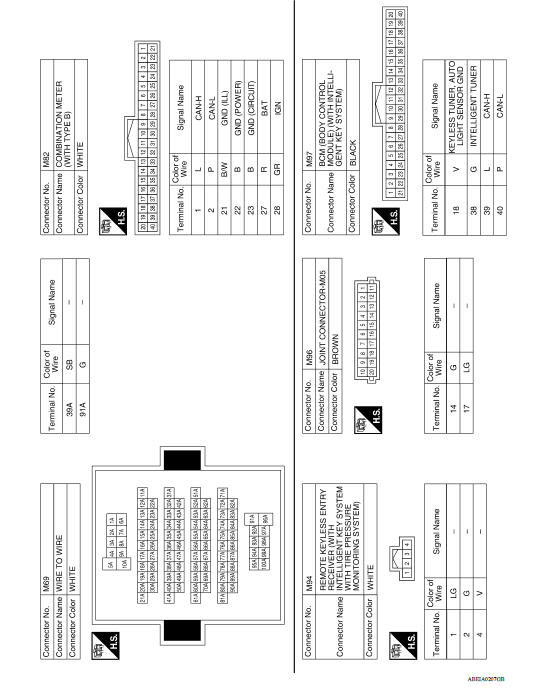
TIRE PRESSURE MONITORING SYSTEM
Wiring Diagram
BASIC INSPECTION
 Air pressure monitor
AIR PRESSURE MONITOR : CONSULT Function (BCM - AIR PRESSURE MONITOR) NOTE: The Signal Tech II Tool (J-50190) can be used to perform the following functions. Refer to the Signal Tech II User Gui ...
Diagnosis and repair work flow
Work Flow NOTE: The Signal Tech II Tool (J-50190) can be used to perform the following functions. Refer to the Signal Tech II User Guide for additional information. Activate and display TPMS ...
Other materials:
Oil pan (upper) and oil strainer
Exploded View
1. Rear oil seal 2. Oring 3. Oil pan (upper)
4. Oil pump chain tensioner (for oil
pump drive chain)
5. Oil pump drive chain 6. Crankshaft key
7. Crankshaft sprocket 8. Oil pump sprocket 9. Oil pump
10. Oring 11. Oring 12. Oil pan drain plug
13. Drain plug washer 14. Oil pan ...
B terminal circuit
Description
Terminal "B" is constantly supplied with battery power.
Diagnosis Procedure
Regarding Wiring Diagram information, refer to STR, "Wiring Diagram - With
Intelligent Key System" or
STR, "Wiring Diagram - Without Intelligent Key System".
CAUTION: Perform diagnosis ...
Categories
- Manuals Home
- Nissan Versa Owners Manual
- Nissan Versa Service Manual
- Video Guides
- Questions & Answers
- External Resources
- Latest Updates
- Most Popular
- Sitemap
- Search the site
- Privacy Policy
- Contact Us

0.0149