
Nissan Versa (N17): Installing front license plate
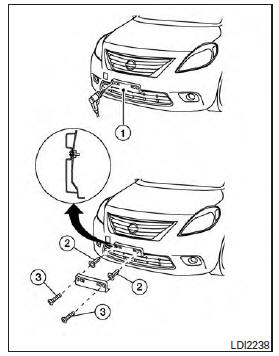
Use the following steps to mount the front license plate: Before mounting the license plate, confirm that the following parts are enclosed in the plastic bag:
- License plate bracket
- License plate bracket screws x 2
- Screw grommets x 2
1. Hold the license plate bracket 1 and make a shallow hole in the bumper fascia using a 0.39 in (10 mm) drill. To avoid damaging the area behind the fascia, apply only light pressure to the drill.
2. Insert the grommets 2 into the holes in the bumper fascia.
3. Insert a small flat-bladed screwdriver into the grommet hole to turn the threaded part of the grommet 90.
4. Mount the license plate bracket using the two longer screws 3 .
 Vehicle identification
Vehicle identification number (VIN) plate The vehicle identification number (VIN) plate is attached as shown. This number is the identification for your vehicle and is used in the vehicle reg ...
Vehicle loading information
WARNING It is extremely dangerous to ride in a cargo area inside a vehicle. In a collision, people riding in these areas are more likely to be seriously injured or killed. Do not allow p ...
Other materials:
4-speed automatic transmission fluid (ATF) (if so equipped)
When checking or replacement of automatic
transmission fluid is required, it is recommended
that you visit a NISSAN dealer for servicing.
WARNING
When the engine is running, keep
hands, jewelry and clothing away from
any moving parts such as the cooling
fan and drive belts
Automatic t ...
OFF Position warning does not operate
Diagnosis Procedure
1.CHECK DTC WITH BCM
Check that DTC is not detected with BCM
Is the inspection result normal?
YES >> GO TO 2.
NO >> Perform trouble diagnosis relevant to DTC indicated.
2.CHECK DTC WITH COMBINATION METER
Check that DTC is not detected with combination meter
...
Categories
- Manuals Home
- Nissan Versa Owners Manual
- Nissan Versa Service Manual
- Video Guides
- Questions & Answers
- External Resources
- Latest Updates
- Most Popular
- Sitemap
- Search the site
- Privacy Policy
- Contact Us

0.0091