
Nissan Versa (N17): EPS Control unit
Exploded View
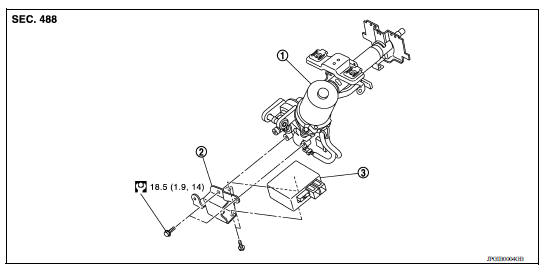
1. Steering column assembly 2. Bracket 3. EPS control unit
Removal and Installation
REMOVAL
- Perform a CPU memory erase on the EPS with CONSULT before removal.
CAUTION:
- Disconnect battery negative terminal before continuing.
- Do not shock EPS control unit, e.g. drop or hit.
- Do not get EPS control unit wet with water or other liquid. Also, do not give EPS control unit a radical temperature change to avoid getting water drops.
- Do not disassemble or remodel EPS control unit, EPS motor, torque sensor, harness and connectors.
- Remove instrument lower panel LH. Refer to IP "Removal and Installation".
- Disconnect harness connectors from EPS control unit.
CAUTION: Hold and pull the connector housing, do not pull on harness when disconnecting connectors.
Also, do not grip, collapse or apply excessive force to the connector.
- Remove EPS control unit from steering column assembly.
- Remove bracket from steering column assembly if necessary.
INSTALLATION
Installation is in the reverse order of removal.
- Check that harness is not damaged when installing EPS control unit. Also, check that EPS control unit is installed without trapping harness on foreign materials.
- After installing steering column assembly, perform self-diagnosis with CONSULT to ensure correct operation.
 Unbalance steering wheel turning force (torque variation)
Description Unbalance steering wheel turning force (torque variation). Diagnosis Procedure 1.PERFORM SELF-DIAGNOSIS With CONSULT Turn the ignition switch OFF to ON. Perform "EPS" self-diagn ...

Other materials:
P0711 Transmission fluid temperature
sensor A
DTC Logic
DTC DETECTION LOGIC
DTC
Trouble diagnosis name
DTC detection condition
Possible causes
P0711
Transmission Fluid Temperature
Sensor "A" Circuit Range/
Performance
Under the following diagnosis
conditions, A/T fluid temperature
does not rise to ...
Transmitter wake up operation
Description
This procedure must be performed after replacement of a transmitter or the
BCM, or rotation of the wheels.
Work Procedure
NOTE:
This procedure must be done after replacement of a TPMS transmitter or BCM. New
replacement transmitters
are provided "asleep" and must first ...
Categories
- Manuals Home
- Nissan Versa Owners Manual
- Nissan Versa Service Manual
- Video Guides
- Questions & Answers
- External Resources
- Latest Updates
- Most Popular
- Sitemap
- Search the site
- Privacy Policy
- Contact Us

0.0055