
Nissan Versa (N17): Battery
Removal and Installation
REMOVAL
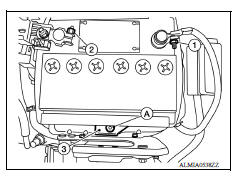
1. Disconnect the battery negative terminal (1).
CAUTION: When disconnecting, disconnect the battery negative terminal first.
2. Disconnect the battery positive terminal (2).
3. Remove the battery wedge bolt (A) and battery wedge bracket (3).
4. Remove the battery cover.
5. Remove the battery.
INSTALLATION
Installation is in the reverse order of removal.
CAUTION:
- When connecting, connect the battery positive terminal first.
- Check battery terminals for poor connection caused by corrosion.
Battery wedge bracket bolt : 17.0 N*m (1.7 kg-m, 13 ft-lb)
Battery terminal nuts : 5.4 N*m (0.55 kg-m, 48 in-lb)
Reset electronic systems as necessary. Refer to PG "ADDITIONAL SERVICE WHEN REMOVING BATTERY NEGATIVE TERMINAL : Special Repair Requirement".
SERVICE DATA AND SPECIFICATIONS (SDS)
Battery

*: Always check with the Parts Department for the latest parts information.
 Harness connector
Description HARNESS CONNECTOR (TAB-LOCKING TYPE) The tab-locking type connectors help prevent accidental looseness or disconnection. The tab-locking type connectors are disconnected by pushi ...
Meter, warning lamp & indicator (MWI)
TYPE A HOW TO USE THIS MANUAL APPLICATION NOTICE Information ...
Other materials:
Windshield-washer fluid
Windshield-washer fluid reservoir
Add a washer solvent to the windshield-washer
fluid reservoir for better cleaning. In the winter
season, add a windshield-washer antifreeze. Follow
the manufacturer's instructions for the mixture
ratio.
Refill the reservoir more frequently when driving
...
P062F EEPROM
Description
TCM compares the calculated value stored in the flash ROM with the value
stored in TCM. If the calculated
value does not agree with the stored value, TCM judges this as a malfunction.
DTC Logic
DTC DETECTION LOGIC
DTC
Trouble diagnosis name
DTC detection condition
...
Categories
- Manuals Home
- Nissan Versa Owners Manual
- Nissan Versa Service Manual
- Video Guides
- Questions & Answers
- External Resources
- Latest Updates
- Most Popular
- Sitemap
- Search the site
- Privacy Policy
- Contact Us

0.0059