
Nissan Versa (N17): Bluetooth antenna
Removal and Installation
REMOVAL
1. Remove the rear seat cushion assembly. Refer to SE "Removal and Installation - Seat Cushion Assembly".
2. Remove the rear step plate (RH).
3. Remove the rear seatback side assembly (RH).
4. Remove the rear seatback assembly (RH).
5. Remove the trunk floor finisher.
6. Remove the trunk rear finisher.
7. Remove the trunk side finisher (RH).
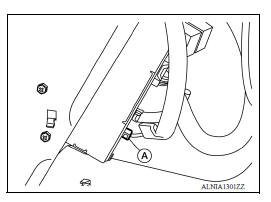
8. Disconnect the Bluetooth antenna from the bluetooth control unit (A).
9. Release the four Bluetooth antenna harness clips (B).
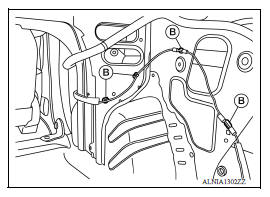
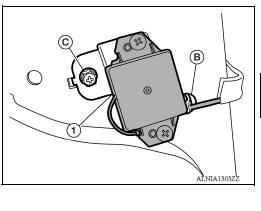
10. Release the remaining Bluetooth antenna harness clip (B) and remove the Bluetooth antenna screw (C).
11. Remove the Bluetooth antenna assembly (1).
INSTALLATION
Installation is in the reverse order of removal.
 Steering audio control switch
Removal and Installation 1. Steering wheel 2. Steering wheel audio control switches 3. Driver air bag module 4. Steering wheel rear finisher REMOVAL 1. Remove the steering wheel. Refer to ...
Microphone
Removal and Installation REMOVAL 1. Remove the microphone (1) from the headlining using a suitable tool. Clip 2. Disconnect the harness connector from microphone and remove. INSTALLATION I ...
Other materials:
Increasing fuel economy
Keep your engine tuned up.
Follow the recommended scheduled maintenance.
Keep the tires inflated to the correct pressure.
Low tire pressure increases tire wear
and lowers fuel economy.
Keep the wheels in correct alignment. Improper
alignment increases tire wear and
lowers fuel eco ...
Installing front license plate
Use the following steps to mount the front license
plate:
Before mounting the license plate, confirm that
the following parts are enclosed in the plastic
bag:
License plate bracket
License plate bracket screws x 2
Screw grommets x 2
1. Hold the license plate bracket 1 and make
a ...
Categories
- Manuals Home
- Nissan Versa Owners Manual
- Nissan Versa Service Manual
- Video Guides
- Questions & Answers
- External Resources
- Latest Updates
- Most Popular
- Sitemap
- Search the site
- Privacy Policy
- Contact Us

0.0055