
Nissan Versa (N17): Power outlets
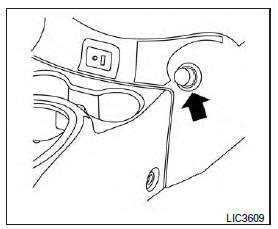
Instrument panel
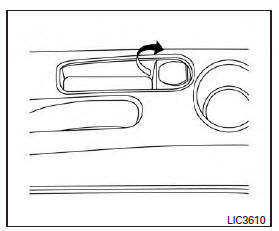
Console (if so equipped)
The power outlets are for powering electrical accessories such as cellular telephones. The outlets are rated at 12 volt, 120W (10A) maximum.
CAUTION
The outlet and plug may be hot during or immediately after use.
- Only certain power outlets are designed for use with a cigarette lighter unit. Do not use any other power outlet for an accessory lighter. It is recommended that you visit a NISSAN dealer for additional information
- Do not use with accessories that exceed a 12 volt, 120W (10A) power draw.
- Do not use double adapters or more than one electrical accessory.
- Use power outlets with the engine running to avoid discharging the vehicle battery.
- Avoid using power outlets when the air conditioner, headlights or rear window defroster is on.
- Before inserting or disconnecting a plug, be sure the electrical accessory being used is turned off.
- Push the plug in as far as it will go. If good contact is not made, the plug may overheat or the internal temperature fuse may open.
- When not in use, be sure to close the cap. Do not allow water or any other liquid to contact the outlet.
 Vehicle Dynamic Control (VDC) off switch
The vehicle should be driven with the VDC system on for most driving conditions. If the vehicle is stuck in mud or snow, the VDC system reduces the engine output to reduce wheel spin. The en ...
Storage
Front-door pockets ...
Other materials:
Line pressure control
Line pressure control : system diagram
Line pressure control : system description
When an engine and A/T integrated control signal (engine torque)
equivalent to the engine drive force is
transmitted from the ECM to the TCM, the TCM controls the line pressure
solenoid valve.
Th ...
U1000 Can comm circuit
Description
CAN (Controller Area Network) is a serial communication line for real-time
application. It is an on-vehicle multiplex
communication line with high data communication speed and excellent malfunction
detection ability.
Many electronic control units are equipped onto a vehicle, and ...
Categories
- Manuals Home
- Nissan Versa Owners Manual
- Nissan Versa Service Manual
- Video Guides
- Questions & Answers
- External Resources
- Latest Updates
- Most Popular
- Sitemap
- Search the site
- Privacy Policy
- Contact Us

0.0087