
Nissan Versa (N17): Front wiper auto stop signal circuit
Component Function Check
1. CHECK FRONT WIPER (AUTO STOP) SIGNAL
1. Select FR WIPER STOP of BCM (WIPER) data monitor item.
2. Operate the front wiper.
3. Check that FR WIPER STOP changes from ON to OFF according to the wiper
position.
Is the inspection result normal?
YES >> Front wiper auto stop signal circuit is normal.
NO >> Refer to WW "Diagnosis Procedure".
Diagnosis Procedure
Regarding Wiring Diagram information, refer to WW "Wiring Diagram".
1. CHECK FRONT WIPER MOTOR (AUTO STOP) OUTPUT VOLTAGE
1. Turn the ignition switch ON.
2. Check voltage between IPDM E/R harness connector and ground.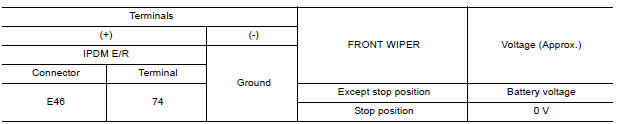
Is the inspection result normal?
YES >> Check for intermittent failure.
NO >> GO TO 2
2. CHECK FRONT WIPER MOTOR (AUTO STOP) SHORT CIRCUIT
1. Turn the ignition switch OFF.
2. Disconnect IPDM E/R and front wiper motor.
3. Check continuity between IPDM E/R harness connector and ground.
Is the inspection result normal?
YES >> Repair or replace harness.
NO >> GO TO 3.
3. CHECK FRONT WIPER MOTOR (AUTO STOP) CIRCUIT CONTINUITY
Check continuity between IPDM E/R harness connector and front wiper motor harness connector.

Is the inspection result normal?
YES >> Replace front wiper motor. Refer to WW "WIPER DRIVE ASSEMBLY : Removal and Installation".
NO >> Repair or replace harness.
 Front wiper motor hi circuit
Front wiper motor ground circuit
Diagnosis Procedure Regarding Wiring Diagram information, refer to WW "Wiring Diagram". 1. CHECK FRONT WIPER MOTOR GROUND CIRCUIT 1. Turn the ignition switch OFF. 2. Disconnect front wip ...
Other materials:
Air bags, seat belts and child restraints
1. Supplemental air bag modules
2. Roof-mounted curtain side-impact and
rollover supplemental air bag
3. Front seat-mounted side-impact
supplemental air bag
4. Front seat belt with pretensioner(s) and
shoulder height adjuster
5. Head restraints/headrests
6. Rear seat belts
7. LATCH (Low ...
Shift P Warning lamp
Component Function Check
1.CHECK FUNCTION
Select INTELLIGENT KEY of BCM using CONSULT.
Select LCD in ACTIVE TEST mode.
Touch SET P to check that it works normally.
Is the inspection result normal?
YES >> Shift P warning lamp is OK.
NO >> Refer to DLK "Diagnosis Proce ...
Categories
- Manuals Home
- Nissan Versa Owners Manual
- Nissan Versa Service Manual
- Video Guides
- Questions & Answers
- External Resources
- Latest Updates
- Most Popular
- Sitemap
- Search the site
- Privacy Policy
- Contact Us

0.007