
Nissan Versa (N17): Microphone signal circuit
Diagnosis Procedure
Regarding Wiring Diagram information, refer to AV "Wiring Diagram".
1.CHECK MICROPHONE SIGNAL CIRCUIT CONTINUITY
1. Turn ignition switch OFF.
2. Disconnect AV control unit connector M71 and microphone connector R15.
3. Check continuity between AV control unit connector M71 and microphone
connector R15.
4. Check continuity between AV control unit connector M71 and ground.
Is inspection result normal?
YES >> GO TO 2.
NO >> Repair or replace harness or connectors.
2.CHECK MICROPHONE VCC VOLTAGE
1. Connect AV control unit connector M71.
2. Turn ignition switch ON.
3. Check voltage between terminals of AV control unit connector M71.
Is the inspection result normal?
YES >> GO TO 3.
NO >> Replace AV control unit. Refer to AV "Removal and Installation".
3.CHECK MICROPHONE SIGNAL
1. Connect microphone connector.
2. Check signal between terminals of AV control unit connector M71.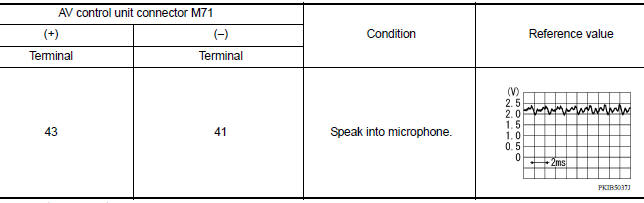
Is the inspection result normal?
YES >> Replace AV control unit. Refer to AV "Removal and Installation".
NO >> Replace microphone. Refer to AV "Removal and Installation".
 Rear view camera image signal circuit
Diagnosis Procedure Regarding Wiring Diagram information, refer to AV "Wiring Diagram". 1.CHECK REVERSE INPUT SIGNAL 1. Turn ignition switch ON. 2. Shift the selector lever to R (reverse ...
Steering switch
Diagnosis Procedure Regarding Wiring Diagram information, refer to AV "Wiring Diagram". 1.CHECK STEERING WHEEL AUDIO CONTROL SWITCH RESISTANCE 1. Turn ignition switch OFF. 2. Disconnect ...
Other materials:
Inspection and adjustment
ADDITIONAL SERVICE WHEN REPLACING
CONTROL UNIT
ADDITIONAL SERVICE WHEN REPLACING
CONTROL UNIT : Special Repair Requirement
Refer to the CONSULT Immobilizer mode and follow the on-screen instructions.
ECM RE-COMMUNICATING FUNCTION
ECM RE-COMMUNICATING FUNCTION : Description
Performing follow ...
Front power window switch
Removal and Installation
REMOVAL
1. Remove front power window and door lock/unlock switch (RH)
finisher assembly using a suitable tool (A).
Pawl
2. Disconnect the harness connector from the front power window and door
lock/unlock switch (RH).
3. Separate front power window and door lock/ ...
Categories
- Manuals Home
- Nissan Versa Owners Manual
- Nissan Versa Service Manual
- Video Guides
- Questions & Answers
- External Resources
- Latest Updates
- Most Popular
- Sitemap
- Search the site
- Privacy Policy
- Contact Us

0.0063