
Nissan Versa (N17): Normal operating condition
Description
RELATED TO NOISE
The majority of the audio concerns are the result of outside causes (bad CD, electromagnetic interference, etc.).
The following noise results from variations in field strength, such as fading noise and multi-path noise, or external noise from trains and other sources. It is not a malfunction.
- Fading noise: This noise occurs because of variations in the field strength in a narrow range due to mountains or buildings blocking the signal.
- Multi-path noise: This noise results from the waves sent directly from the broadcast station arriving at the antenna at a different time from the waves which reflect off mountains or buildings.
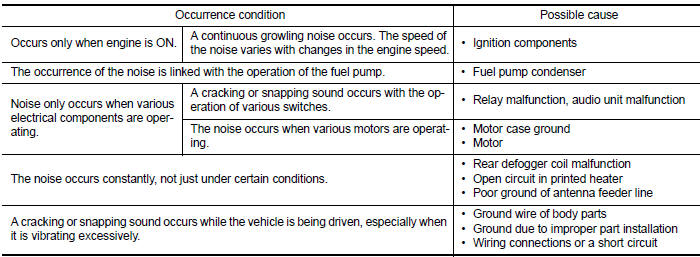
The vehicle itself can be a source of noise if noise prevention parts or electrical equipment is malfunctioning.
Check if noise is caused and/or changed by engine speed, ignition switch turned to each position, and operation of each piece of electrical equipment, and determine the cause.
NOTE: The source of the noise can be found easily by listening to the noise while removing the fuses of electrical components, one by one.
Type of Noise and Possible Cause
RELATED TO HANDS-FREE PHONE
|
Symptom |
Cause and Counter measure |
| Does not recognize cellular phone connection (No connection is displayed on the display at the guide). | Some Bluetooth enabled cellular phones may not be recognized
by the in-vehicle phone module.
Refer to "RELATED TO HANDS-FREE PHONE (Check Compatibility)" in AV "Symptom Table". |
| Cannot use hands-free phone. | Customer will not be able to use a hands-free phone under the
following
conditions: - The vehicle is outside of the telephone service area. - The vehicle is in an area where it is difficult to receive radio waves; such as in a tunnel, in an underground parking garage, near a tall building or in a mountainous area. - The cellular phone is locked to prevent it from being dialed. NOTE: While a cellular phone is connected through the Bluetooth wireless connection, the battery power of the cellular phone may discharge quicker than usual. The Bluetooth Hands-Free Phone System cannot charge cellular phones. |
| The other party's voice cannot be heard by hands-free phone. | When the radio wave condition is not ideal or ambient sound is too loud, it may be difficult to hear the other person's voice during a call. |
| Poor sound quality. | Do not place the cellular phone in an area surrounded by metal or far away from the in-vehicle phone module to prevent tone quality degradation and wireless connection disruption. |
REMOVAL AND INSTALLATION
 Audio system
Symptom Table RELATED TO AUDIO RELATED TO HANDS-FREE PHONE Before performing diagnosis, confirm that the cellular phone being used by the customer is compatible with the vehicl ...
Audio unit
Removal and Installation REMOVAL 1. Remove cluster lid C. Refer to IP "Removal and Installation". 2. Remove the audio unit screws (A). 3. Pull the audio unit out. 4. Disconnect the ha ...
Other materials:
Engine protection control at low engine oil pressure
Engine protection control at low engine oil pressure : system diagram
Engine protection control at low engine
oil pressure : system description
INPUT/OUTPUT SIGNAL CHART
Sensor
Input signal to ECM
ECM function
Actuator
Engine oil pressure sensor
Engine pressure
...
Air breather hose
Exploded View
1. Cap 2. Air breather hose 3. 2-way connector
Removal and Installation
REMOVAL
Remove air cleaner case. Refer to EM, "Removal and Installation".
Remove air breather hose from the 2-way connector.
CAUTION:
When removing air breather hose, be sure to hold 2- ...
Categories
- Manuals Home
- Nissan Versa Owners Manual
- Nissan Versa Service Manual
- Video Guides
- Questions & Answers
- External Resources
- Latest Updates
- Most Popular
- Sitemap
- Search the site
- Privacy Policy
- Contact Us

0.0094