
Nissan Versa (N17): Roof antenna
Exploded View
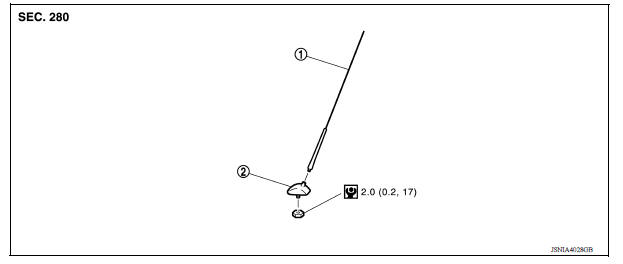
1. Antenna mast 2. Antenna base
Removal and Installation
REMOVAL
1. Remove the headlining. Refer to INT "Removal and Installation".
2. Disconnect the antenna cable.
3. Remove the antenna base nut.
4. Remove the antenna base from the roof panel.
INSTALLATION
Installation is in the reverse order of removal.
CAUTION: Tighten the antenna base nut to specifications.
- If the antenna base nut is less than the specified torque, it will affect the function of the antenna.
- If the antenna base nut is greater than the specified torque, it will damage the roof panel.
 Rear door speaker
Removal and Installation REMOVAL 1. Remove the rear door finisher. Refer to INT "Removal and Installation". 2. Remove the rear door speaker screws (A). 3. Disconnect the harness connec ...
Steering audio control switch
Removal and Installation 1. Steering wheel 2. Steering wheel audio control switches 3. Driver air bag module 4. Steering wheel rear finisher REMOVAL 1. Remove the steering wheel. Refer to ...
Other materials:
Control panel buttons - color screen with Navigation System (if so equipped)
WARNING
Positioning of the heating or air conditioning
controls and display controls
should not be done while driving in order
that full attention may be given to
the driving operation.
Do not disassemble or modify this system.
If you do, it may result in accidents,
fire, or elec ...
Variable voltage control system (if so equipped)
CAUTION
Do not ground accessories directly to
the battery terminal. Doing so will bypass
the variable voltage control system
and the vehicle battery may not
charge completely.
Use electrical accessories with the engine
running to avoid discharging the
vehicle battery.
Your v ...
Categories
- Manuals Home
- Nissan Versa Owners Manual
- Nissan Versa Service Manual
- Video Guides
- Questions & Answers
- External Resources
- Latest Updates
- Most Popular
- Sitemap
- Search the site
- Privacy Policy
- Contact Us

0.007