
Nissan Versa (N17): Audio unit
Removal and Installation
REMOVAL
1. Remove cluster lid C. Refer to IP "Removal and Installation".
2. Remove the audio unit screws (A).
3. Pull the audio unit out.
4. Disconnect the harness connectors from the audio unit and remove.
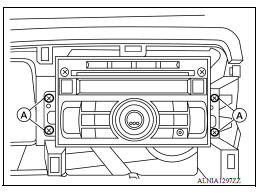
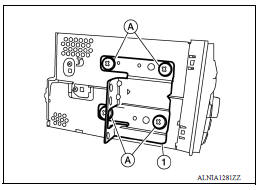
5. Remove the audio unit bracket screws (A) and the audio unit bracket (1) from each side of the audio unit (if necessary).
INSTALLATION
Installation is in the reverse order of removal.
 Normal operating condition
Description RELATED TO NOISE The majority of the audio concerns are the result of outside causes (bad CD, electromagnetic interference, etc.). The following noise results from variations in ...
Front door speaker
Removal and Installation REMOVAL 1. Remove the front door finisher. Refer to INT "Removal and Installation". 2. Remove the front door speaker screws (A). 3. Disconnect the harness conn ...
Other materials:
Drive belt idler pulley
Exploded View
1. Generator bracket 2. Center shaft 3. Spacer
4. Adjusting bolt 5. Washer 6. Idler pulley
7. Plate
Removal and Installation
REMOVAL
Remove the fender protector (RH).
Remove the air duct inlet assembly.
Remove drive belt.
Remove the lock nut, and then remove the pl ...
Lock-up control
LOCK-UP CONTROL : System Description
SYSTEM DIAGRAM
DESCRIPTION
Controls for improvement of the transmission efficiency by engaging the
torque converter clutch in the
torque converter and eliminating slip of the converter. Achieves comfortable
driving with slip control of the
t ...
Categories
- Manuals Home
- Nissan Versa Owners Manual
- Nissan Versa Service Manual
- Video Guides
- Questions & Answers
- External Resources
- Latest Updates
- Most Popular
- Sitemap
- Search the site
- Privacy Policy
- Contact Us

0.0084