
Nissan Versa (N17): Combination meter
Exploded View
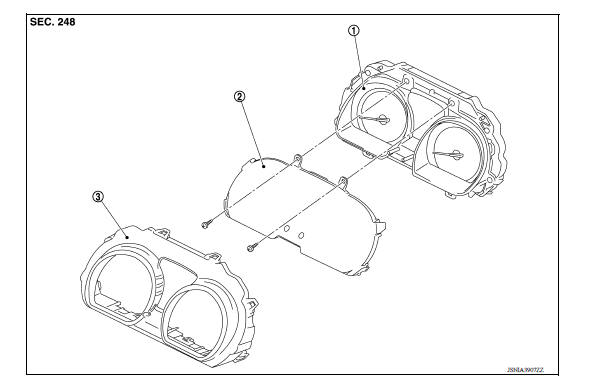
1. Unified meter control unit 2. Front cover 3. Finisher
Disassembly and Assembly
DISASSEMBLY
1. Disengage the pawls of the finisher using a suitable tool and remove the finisher.\
2. Remove the screws of the front cover.
3. Disengage the pawls of the front cover using a suitable tool.
4. Pull the front cover straight out to remove from the unified meter control unit.\
CAUTION:
- Do not touch the display, pointer, the inside of front cover and the printed area of the dial during the work.
- Keep away from magnetic sources.
- Do not damage the front cover.
ASSEMBLY
Assembly is in the reverse order of disassembly.
CAUTION:
- Do not touch the display, pointer, the inside of front cover and the printed area of the dial during the work.
- Keep away from magnetic sources.
- Do not damage the front cover.
 Combination meter
Removal and Installation REMOVAL 1. Disconnect the negative battery terminal. Refer to PG "Removal and Installation". 2. Remove cluster lid A. Refer to IP "Removal and Installati ...
Precautions
Precaution for Supplemental Restraint System (SRS) "AIR BAG" and "SEAT BELT PRE-TENSIONER" The Supplemental Restraint System such as "AIR BAG" and "SEAT BELT PRE-TENSIONER", us ...
Other materials:
Car phone or CB radio
When installing a CB, ham radio or car phone in
your vehicle, be sure to observe the following
precautions; otherwise, the new equipment may
adversely affect the engine control system and
other electronic parts.
WARNING
A cellular phone should not be used for
any purpose while driving so ...
Unexpected pedal reaction
Diagnosis Procedure
1.CHECK BRAKE PEDAL STROKE
Check brake pedal stroke. Refer to BR "Inspection and Adjustment".
Is the stroke too big?
YES >>
Bleed air from brake line and hose. Refer to BR "Bleeding Brake System".
Check brake pedal, brake booster, and master cy ...
Categories
- Manuals Home
- Nissan Versa Owners Manual
- Nissan Versa Service Manual
- Video Guides
- Questions & Answers
- External Resources
- Latest Updates
- Most Popular
- Sitemap
- Search the site
- Privacy Policy
- Contact Us

0.009