
Nissan Versa (N17): Diagnosis and repair work flow
Work Flow
OVERALL SEQUENCE
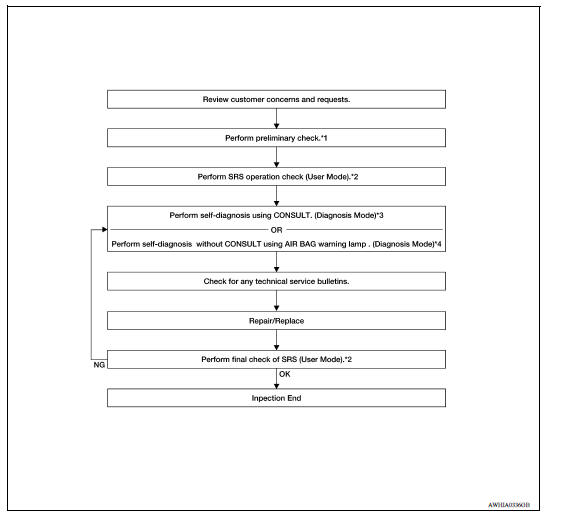
*1 SRC "Diagnosis Description" *2 SRC "SRS Operation Check" *3 SRC "Trouble Diagnosis with CONSULT" *4 SRC "Trouble Diagnosis without CONSULT"
DETAILED WORK FLOW
1.CUSTOMER INFORMATION
Get detailed information from the customer about the symptom.
>> GO TO 2
2.PRELIMINARY CHECK
Perform preliminary check. Refer to SRC "Diagnosis Description".
>> GO TO 3
3.SRS OPERATION CHECK (USER MODE)
Perform SRS operation check in User Mode. Refer to SRC "SRS Operation Check".
>> GO TO 4
4.SELF-DIAGNOSIS (DIAGNOSIS MODE)
Perform SELF-DIAGNOSIS. Refer to SRC "Trouble Diagnosis with CONSULT"or SRC"Trouble Diagnosis without CONSULT".
>> GO TO 5
5.TECHNICAL SERVICE BULLETINS
Check for technical service bulletins.
>> GO TO 6
6.REPLACE PART
Replace the malfunctioning part.
>> GO TO 7
7.FINAL CHECK
Check SRS using Diagnosis Mode and User Mode.
Does Diagnosis Mode and User Mode indicate SRS normal?
YES >> Inspection End.
NO >> GO TO 4
 Diagnosis sensor unit
DTC Index DIAGNOSTIC CODE CHART NOTE: Follow the procedures in numerical order when repairing malfunctioning parts. Confirm whether malfunction is eliminated using air bag warning lamp or CONSU ...

Other materials:
Multiport fuel injection system
MULTIPORT FUEL INJECTION SYSTEM : System Diagram
MULTIPORT FUEL INJECTION SYSTEM : System
Description
INPUT/OUTPUT SIGNAL CHART
Sensor
Input signal to ECM
ECM function
Actuator
Crankshaft position sensor (POS)
Engine speed*4
Piston position
Fuel injection & ...
Parking, license plate and tail lamp
system
PARKING, LICENSE PLATE AND TAIL LAMP SYSTEM : System Diagram
PARKING, LICENSE PLATE AND TAIL LAMP SYSTEM : System Description
PARKING, LICENSE PLATE AND TAIL LAMPS OPERATION
When the combination switch (lighting and turn signal switch) is in 1st
position, BCM detects the LIGHTING
SWITCH ...
Categories
- Manuals Home
- Nissan Versa Owners Manual
- Nissan Versa Service Manual
- Video Guides
- Questions & Answers
- External Resources
- Latest Updates
- Most Popular
- Sitemap
- Search the site
- Privacy Policy
- Contact Us

0.024