
Nissan Versa (N17): Keyfob battery and function
Description
The following functions are available when having and carrying the keyfob.
- Door lock/unlock
- Panic mode (horn and headlamp operation)
Remote control entry function and panic alarm function are available when operating the remote buttons.
Component Function Check
NOTE: The Signal Tech II Tool (J-50190) can be used to test the remote keyless entry keyfob relative signal strength.
Refer to the Signal Tech II User Guide for additional information.
1.CHECK FUNCTION
With CONSULT
Check remote keyless entry receiver KEYLESS LOCK, KEYLESS UNLOCK, KYLS TRNK/HAT
and KEYLESS PANIC in Data Monitor mode with CONSULT. 
Is the inspection result normal?
YES >> Keyfob is OK.
NO >> Refer to DLK "Diagnosis Procedure".
Diagnosis Procedure
NOTE: The Signal Tech II Tool (J-50190) can be used to test the remote keyless entry keyfob relative signal strength.
Refer to the Signal Tech II User Guide for additional information.
1.CHECK KEYFOB FUNCTION
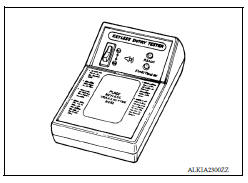
Check keyfob function using Signal Tech II Tool J-50190 or Remote Keyless Entry Tester J-43241 (shown).
Does the test pass?
YES >> Keyfob is OK.
NO >> GO TO 2
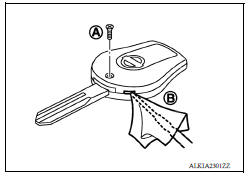
2. CHECK KEYFOB COMPONENTS
- Remove the screw (A).
- Insert a small screwdriver into the slit of the corner (B) and twist
it to separate the upper part from the power part. Use a cloth to
protect the casing.
CAUTION: Do not touch the circuit board or battery terminal. The keyfob is water-resistant. However, if it does get wet, immediately wipe it dry.
- Remove the keyfob battery.
CAUTION: Keep dirt, grease, and other foreign materials off the electrode contact area.
- Visually inspect keyfob internal components.
Is the inspection result normal?
YES >> GO TO 3
NO >> Repair or replace malfunctioning parts.
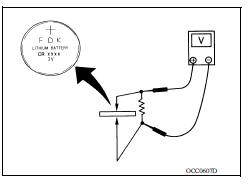
3.CHECK KEYFOB BATTERY
Check by connecting a resistance (approximately 300Ω) so that the current value becomes about 10 mA.
Standard : Approx. 2.5 - 3.0V
Is the measurement value within specification?
YES >> Keyfob battery is OK. Check remote keyless entry receiver. Refer to DLK "Component Function Check".
NO >> GO TO 4
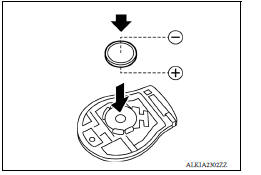
4. REPLACE KEYFOB BATTERY
1. Replace the keyfob battery with a new one (CR1620 or equivalent).
CAUTION:
- When replacing battery, keep dirt, grease, and other foreign materials off the electrode contact area.
- Make sure that the + side faces the bottom of the case.
2. Align the tips of the upper and lower parts, and then push them together until it is securely closed.
3. After replacing the battery, check that all keyfob functions work properly.
Is the inspection result normal?
YES >> Keyfob is OK.
NO >> Check remote keyless entry receiver. Refer to DLK "Component Function Check".
 Remote keyless entry receiver
Description Receives keyfob operation and transmits to BCM. ...
Horn function
Description Perform answer-back for each operation with horn. ...
Other materials:
Front suspension assembly
Inspection and Adjustment
INSPECTION
Make sure the mounting conditions (looseness, back lash) of each component
and component conditions
(wear, damage) are normal.
LOWER BALL JOINT END PLAY
Set front wheels in a straight-ahead position. Do not depress brake
pedal.
Place an iron bar ...
C1704, C1705, C1706, C1707 Low tire
pressure
DTC Logic
DTC DETECTION LOGIC
DTC CONFIRMATION PROCEDURE
1.PERFORM SELF DIAGNOSTIC RESULT
With CONSULT
Turn the ignition switch ON.
Check the tire pressure for all wheels and adjust to the specified
value. Refer to WT ...
Categories
- Manuals Home
- Nissan Versa Owners Manual
- Nissan Versa Service Manual
- Video Guides
- Questions & Answers
- External Resources
- Latest Updates
- Most Popular
- Sitemap
- Search the site
- Privacy Policy
- Contact Us

0.0064