
Nissan Versa (N17): Parking brake control
Exploded View
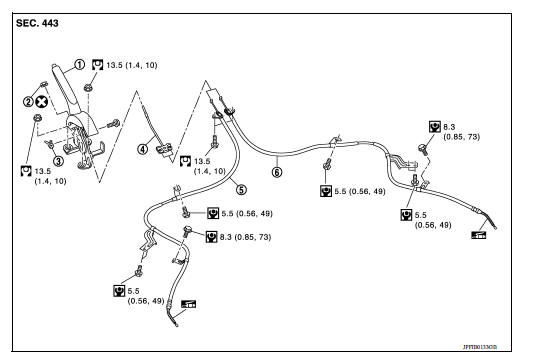
1. Parking brake lever assembly 2. Adjusting nut 3. Parking brake switch 4. Front cable 5. Rear cable (LH) 6. Rear cable (RH)
Removal and Installation
REMOVAL
- Remove rear wheel and tire assemblies using power tool. Refer to WT "Adjustment".
- Remove the center console assembly. Refer to IP "Removal and Installation".
- Disconnect the harness connector from the parking brake switch.
- Remove and discard the adjusting nut to loosen the front cable.
CAUTION: Do not reuse the adjusting nut.
- Separate both rear cables from the front cable.
- Remove the parking brake lever assembly and front cable.
- Remove the front cable from parking brake lever assembly.
- Remove the parking brake switch from parking brake lever assembly.
- Remove both rear cables from the toggle lever.
- Remove the center floor insulator to gain access to the rear cable bolts.
- Remove the brake shoes and disconnect the rear cables from the toggle levers. Refer to BR "Removal and Installation".
- Disconnect and remove the rear cables from each backing plate.
INSTALLATION
Installation is in the reverse order of the removal.
CAUTION: Do not reuse the adjusting nut.
- Perform adjustment after installation. Refer to PB "Inspection and Adjustment".
SERVICE DATA AND SPECIFICATIONS (SDS)
Parking Brake Control

 Parking brake system
Inspection and Adjustment INSPECTION When parking brake lever is operated with a force of 196 N (20 kg-f, 44 lb-f), make sure parking brake lever stroke is within the specified number of notches. ...

Other materials:
Oil pan (lower)
Exploded View
1. Rear oil seal 2. Oring 3. Oil pan (upper) 4. Oil pump chain tensioner
(for oil pump drive chain) 5. Oil pump drive chain 6. Crankshaft key 7.
Crankshaft sprocket 8. Oil pump sprocket 9. Oil pump 10. Oring 11. Oring 12.
Oil pan drain plug 13. Drain plug washer 14. Oil pan ...
Front suspension member
Exploded View
1. Front suspension member 2. Transverse link
Removal and Installation
REMOVAL
Remove the wheel and tire assemblies using power tool. Refer to WT
"Adjustment".
Remove transverse link. Refer to FSU-12, "Removal and Installation".
Remove steering o ...
Categories
- Manuals Home
- Nissan Versa Owners Manual
- Nissan Versa Service Manual
- Video Guides
- Questions & Answers
- External Resources
- Latest Updates
- Most Popular
- Sitemap
- Search the site
- Privacy Policy
- Contact Us

0.0107