
Nissan Versa (N17): Diagnosis and repair work flow
Work Flow
OVERALL SEQUENCE
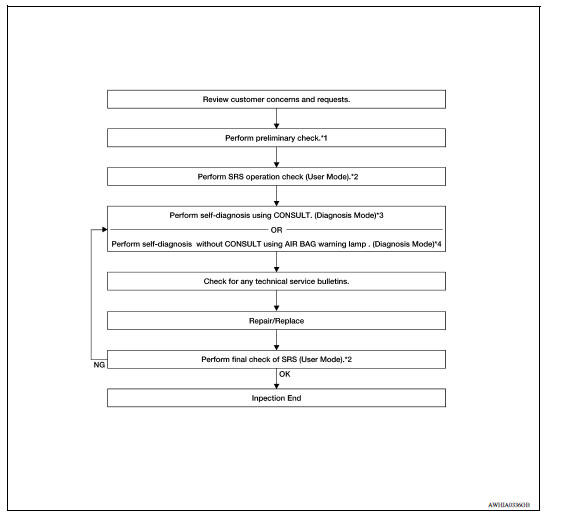
*1 SRC "Diagnosis Description" *2 SRC "SRS Operation Check" *3 SRC "Trouble Diagnosis with CONSULT" *4 SRC "Trouble Diagnosis without CONSULT"
DETAILED WORK FLOW
1.CUSTOMER INFORMATION
Get detailed information from the customer about the symptom.
>> GO TO 2
2.PRELIMINARY CHECK
Perform preliminary check. Refer to SRC "Diagnosis Description".
>> GO TO 3
3.SRS OPERATION CHECK (USER MODE)
Perform SRS operation check in User Mode. Refer to SRC "SRS Operation Check".
>> GO TO 4
4.SELF-DIAGNOSIS (DIAGNOSIS MODE)
Perform SELF-DIAGNOSIS. Refer to SRC "Trouble Diagnosis with CONSULT"or SRC"Trouble Diagnosis without CONSULT".
>> GO TO 5
5.TECHNICAL SERVICE BULLETINS
Check for technical service bulletins.
>> GO TO 6
6.REPLACE PART
Replace the malfunctioning part.
>> GO TO 7
7.FINAL CHECK
Check SRS using Diagnosis Mode and User Mode.
Does Diagnosis Mode and User Mode indicate SRS normal?
YES >> Inspection End.
NO >> GO TO 4
 Diagnosis sensor unit
DTC Index DIAGNOSTIC CODE CHART NOTE: Follow the procedures in numerical order when repairing malfunctioning parts. Confirm whether malfunction is eliminated using air bag warning lamp or CONSU ...

Other materials:
Engine stand setting
Setting
NOTE:
The following procedures explain how to disassemble the engine with the engine
stand fastened to the bell
housing. Some steps may be different if using a different type of engine stand.
1. Install engine to engine stand:
a. Rem ...
Stall test
Work Procedure
INSPECTION
Inspect the amount of engine oil. Replenish the engine oil if necessary.
Refer to LU "Inspection".
Drive for about 10 minutes to warm up the vehicle so that the A/T fluid
temperature is 50 to 80C (122 to
176F).
Inspect the amount of ATF. Replenish ...
Categories
- Manuals Home
- Nissan Versa Owners Manual
- Nissan Versa Service Manual
- Video Guides
- Questions & Answers
- External Resources
- Latest Updates
- Most Popular
- Sitemap
- Search the site
- Privacy Policy
- Contact Us

0.0106