
Nissan Versa (N17): Audio system
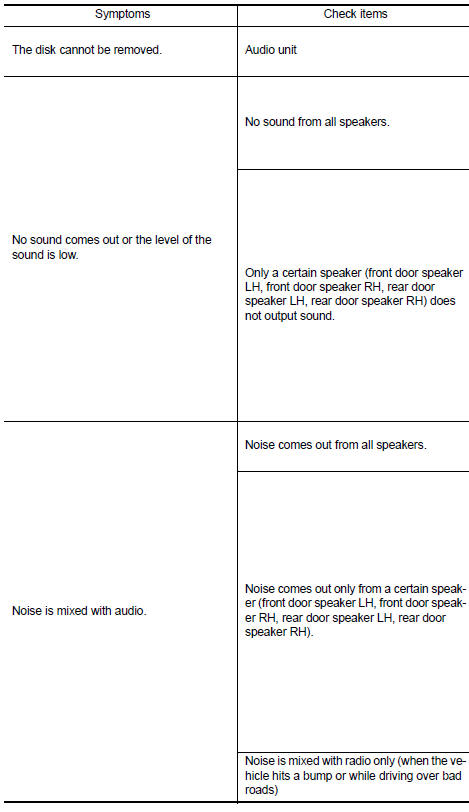
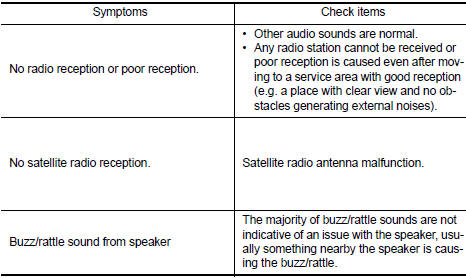
Symptom Table
RELATED TO AUDIO
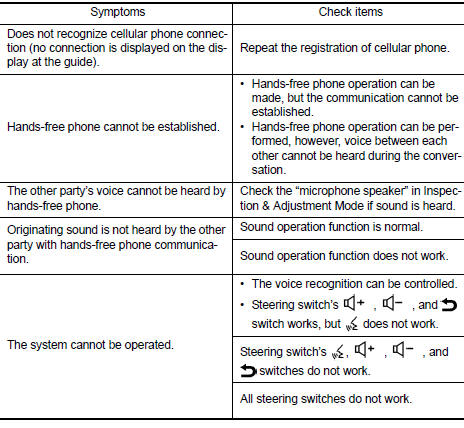
RELATED TO HANDS-FREE PHONE
Before performing diagnosis, confirm that the cellular phone being used by the customer is compatible with the vehicle.
It is possible that a malfunction is occurring due to a version change of the phone even though the phone is a compatible type. This can be confirmed by changing the cellular phone to another compatible type, and check that it operates normally. It is important to determine whether the cause of the malfunction is the vehicle or the cellular phone.
Check Compatibility
1. Make sure the customer's Bluetooth related concern is understood.
2. Verify the customer's concern.
NOTE: The customer's phone may be required, depending upon their concern.
3. Write down the customer's phone brand, model and service provider.
NOTE: It is necessary to know the service provider. On occasion, a given phone may be on the approved list with one provider, but may not be on the approved list with other providers.
4. Go to "www.nissanusa.com/bluetooth/".
a. Using the website's search engine, find out if the customer's phone is on the approved list.
b. If the customer's phone is NOT on the approved list: Stop diagnosis here. The customer needs to obtain a Bluetooth phone that is on the approved list before any further action.
c. If the feature related to the customer's concern shows as "N" (not compatible): Stop diagnosis here. If the customer still wants the feature to function, they will need to get an approved phone showing the feature as "Y" (compatible) in the "Basic Features".
d. If the feature related to the customer's concern shows as "Y" (compatible): Perform diagnosis as per the following table.
 USB Connector
Diagnosis Procedure Regarding Wiring Diagram information, refer to AV "Wiring Diagram". 1.CHECK USB INTERFACE HARNESS CONTINUITY 1. Turn ignition switch OFF. 2. Disconnect audio unit c ...
Normal operating condition
Description RELATED TO NOISE The majority of the audio concerns are the result of outside causes (bad CD, electromagnetic interference, etc.). The following noise results from variations in fi ...
Other materials:
P0507 ISC system
Description
The ECM controls the engine idle speed to a specified level through the fine
adjustment of the air, which is let
into the intake manifold, by operating the electric throttle control actuator.
The operating of the throttle valve is
varied to allow for optimum control of the engine ...
Blower motor
Exploded View
1. A/C unit assembly 2. Blower motor 3. Blower fan resistor
Removal and Installation
REMOVAL
Disconnect the negative battery terminal. Refer to PG "Removal and
Installation".
Remove the lower knee protector (LH). Refer to IP "Exploded View".
Remove ...
Categories
- Manuals Home
- Nissan Versa Owners Manual
- Nissan Versa Service Manual
- Video Guides
- Questions & Answers
- External Resources
- Latest Updates
- Most Popular
- Sitemap
- Search the site
- Privacy Policy
- Contact Us

0.006