
Nissan Versa (N17): USB Connector
Diagnosis Procedure
Regarding Wiring Diagram information, refer to AV "Wiring Diagram".
1.CHECK USB INTERFACE HARNESS CONTINUITY
1. Turn ignition switch OFF.
2. Disconnect audio unit connector M48 and USB interface connector M72.
3. Check continuity between audio unit connector M48 and USB interface
connector M72.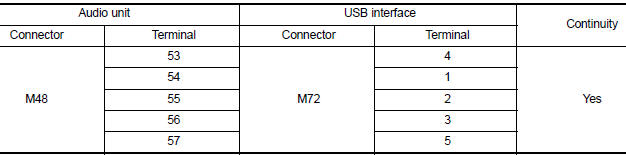
4. Check continuity between audio unit connector M48 and ground.
Is the inspection result normal?
YES >> Replace the USB interface. Refer to AV "Removal and Installation".
NO >> Repair or replace harness or connectors.
SYMPTOM DIAGNOSIS
 Steering switch
Diagnosis Procedure Regarding Wiring Diagram information, refer to AV "Wiring Diagram". 1.CHECK STEERING WHEEL AUDIO CONTROL SWITCH RESISTANCE 1. Turn ignition switch OFF. 2. Disconnect ...
Audio system
Symptom Table RELATED TO AUDIO RELATED TO HANDS-FREE PHONE Before performing diagnosis, confirm that the cellular phone being used by the customer is compatible with the vehicle. It i ...
Other materials:
Front regulator
Exploded View
1. Front door panel 2. Front door lower sash (front) 3. Front door glass run
4. Front door sealing screen 5. Front door power window motor 6. Front door
regulator
7. Front door glass 8. Front door lower sash (rear) 9. Regulator seal (manual
window)
10. Snap pin (manual wind ...
Power window main switch
Removal and Installation
REMOVAL
1. Remove main power window and door lock/unlock switch finisher
assembly using a suitable tool (A).
Pawl
2. Disconnect the harness connector from the main power window and door
lock/unlock switch.
3. Separate main power window and door lock/unlock switch ...
Categories
- Manuals Home
- Nissan Versa Owners Manual
- Nissan Versa Service Manual
- Video Guides
- Questions & Answers
- External Resources
- Latest Updates
- Most Popular
- Sitemap
- Search the site
- Privacy Policy
- Contact Us

0.0069