
Nissan Versa (N17): Audio unit
Removal and Installation
REMOVAL
1. Remove cluster lid C. Refer to IP "Removal and Installation".
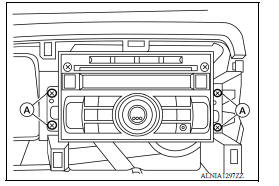
2. Remove the audio unit screws (A).
3. Pull the audio unit out.
4. Disconnect the harness connectors from the audio unit and remove.
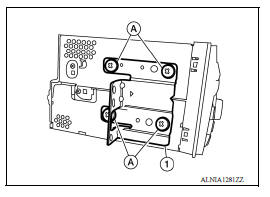
5. Remove the audio unit bracket screws (A) and the audio unit bracket (1) from each side of the audio unit (if necessary).
INSTALLATION
Installation is in the reverse order of removal.
 Normal operating condition
Description The majority of the audio troubles are the result of outside causes (bad CD, electromagnetic interference, etc.). NOISE The following noise results from variations in field strengt ...
Front door speaker
Removal and Installation REMOVAL 1. Remove the front door finisher. Refer to INT "Removal and Installation". 2. Remove the front door speaker screws (A). 3. Disconnect the harness conn ...
Other materials:
Break-in schedule
CAUTION
During the first 1,200 miles (2,000 km),
follow these recommendations to obtain
maximum engine performance and ensure
the future reliability and economy of your
new vehicle. Failure to follow these recommendations
may result in shortened
engine life and reduced engine
performance.
...
Brake drum
BRAKE DRUM : Inspection and Adjustment
INSPECTION
Appearance
Check surface of brake drum for uneven wear, cracks and serious damage.
Replace it if necessary. Refer to
BR "Removal and Installation".
Brake Drum Inner Diameter
Check inner diameter (B) of the brake drum.
(B) : Refe ...
Categories
- Manuals Home
- Nissan Versa Owners Manual
- Nissan Versa Service Manual
- Video Guides
- Questions & Answers
- External Resources
- Latest Updates
- Most Popular
- Sitemap
- Search the site
- Privacy Policy
- Contact Us

0.0068