
Nissan Versa (N17): Bluetooth voice signal circuit
Diagnosis Procedure
Regarding Wiring Diagram information, refer to AV "Wiring Diagram".
1.CHECK BLUETOOTH VOICE SIGNAL CIRCUIT CONTINUITY
1. Turn ignition switch OFF.
2. Disconnect audio unit connector M45 and Bluetooth control unit connector B33.
3. Check continuity between audio unit connector M45 and Bluetooth control
unit connector B33.
4. Check continuity between audio unit connector M45 and ground.
Is inspection result normal?
YES >> GO TO 2.
NO >> Repair or replace harness or connectors.
2.CHECK BLUETOOTH VOICE SIGNAL GROUND CIRCUIT CONTINUITY
Check continuity between audio unit connector M45 and Bluetooth control unit
connector B33.
Is inspection result normal?
YES >> GO TO 3.
NO >> Repair or replace harness or connectors.
3.CHECK BLUETOOTH VOICE SIGNAL
1. Connect audio unit connector M45 and Bluetooth control unit connector B33.
2. Turn ignition switch to ACC.
3. Press  switch.
4. Check signal between the terminals of audio unit connector M45.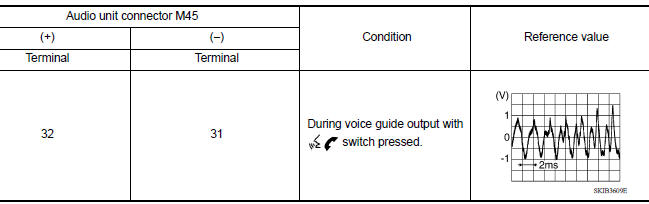
Is the inspection result normal?
YES >> Replace Bluetooth control unit. Refer to AV "Removal and Installation".
NO >> Replace audio unit. Refer to AV "Removal and Installation".
 Rear door speaker
Diagnosis Procedure Regarding Wiring Diagram information, refer to AV "Wiring Diagram". 1.CONNECTOR CHECK Check the audio unit and speaker connectors for the following: Proper conne ...
Bluetooth control signal circuit
Diagnosis Procedure Regarding Wiring Diagram information, refer to AV "Wiring Diagram". 1.CHECK CONTROL SIGNAL CIRCUIT CONTINUITY 1. Turn ignition switch OFF. 2. Disconnect Bluetooth con ...
Other materials:
Fuel pressure check
Work Procedure
FUEL PRESSURE RELEASE
1.FUEL PRESSURE RELEASE
With CONSULT
Turn ignition switch ON.
Perform "FUEL PRESSURE RELEASE" in "WORK SUPPORT" mode with CONSULT.
Start engine.
After engine stalls, crank it two or three times to release all fuel
pressure.
Turn ignition switc ...
Power supply and ground circuit
Diagnosis Procedure
Regarding Wiring Diagram information, refer to BCS "Wiring Diagram".
1.CHECK FUSES AND FUSIBLE LINK
Check that the following fuses and fusible link are not blown.
Is the fuse blown?
YES >> Replace the blown fuse or fusible link after repairing the affected ...
Categories
- Manuals Home
- Nissan Versa Owners Manual
- Nissan Versa Service Manual
- Video Guides
- Questions & Answers
- External Resources
- Latest Updates
- Most Popular
- Sitemap
- Search the site
- Privacy Policy
- Contact Us

0.0165