
Nissan Versa (N17): Combination meter
Exploded View
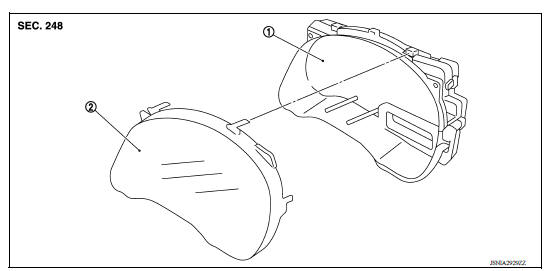
1. Unified meter control unit 2. Front cover
Disassembly and Assembly
DISASSEMBLY
1. Disengage the tabs to separate front cover using a suitable tool.
2. Pull the front cover straight out to remove from the unified meter control unit.
CAUTION:
- Do not touch the display, pointer, the inside of front cover and the printed area of the dial during the work.
- Keep away from magnetic sources.
- Do not damage the front cover.
ASSEMBLY
Assembly is in the reverse order of disassembly.
CAUTION:
- Do not touch the display, pointer, the inside of front cover and the printed area of the dial during the work.
- Keep away from magnetic sources.
- Do not damage the front cover.
TYPE B
HOW TO USE THIS MANUAL
APPLICATION NOTICE
Information
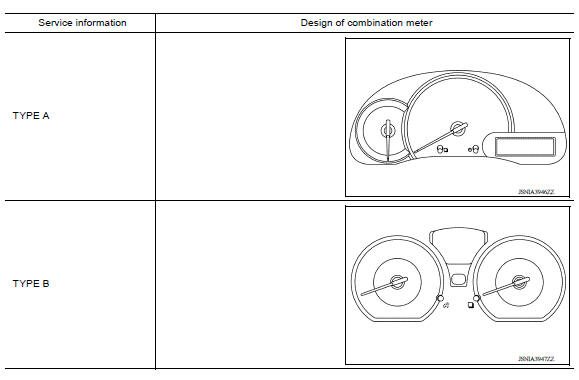
 Combination meter
Removal and Installation REMOVAL 1. Disconnect the negative battery terminal. Refer to PG "Removal and Installation". 2. Remove cluster lid A. Refer to IP "Removal and Installati ...

Other materials:
Rear window defroster switch
To defrost the rear window glass, start the engine
and push the rear window defroster switch on.
The rear window defroster indicator light on the
switch comes on. Push the switch again to turn
the defroster off.
The rear window defroster automatically turns off
after approximately 15 m ...
Specifications
Engine
This spark ignition system complies with the Canadian standard ICES-002.
Wheels and tires
Dimensions and weights
...
Categories
- Manuals Home
- Nissan Versa Owners Manual
- Nissan Versa Service Manual
- Video Guides
- Questions & Answers
- External Resources
- Latest Updates
- Most Popular
- Sitemap
- Search the site
- Privacy Policy
- Contact Us

0.0072