
Nissan Versa (N17): Door lock and unlock switch
Component Function Check
1.CHECK FUNCTION
- Select DOOR LOCK of BCM using CONSULT.
- Select CDL LOCK SW, CDL UNLOCK SW in DATA MONITOR mode.
- Check that the function operates normally according to the following
conditions.

Is the inspection result normal?
YES >> Main power window and door lock/unlock switch is OK.
NO >> Refer to DLK "Diagnosis Procedure".
Diagnosis Procedure
Regarding Wiring Diagram information, refer to DLK "POWER DOOR LOCK SYSTEM : Wiring Diagram".
1.CHECK DOOR LOCK AND UNLOCK SWITCH INPUT SIGNAL
- Turn ignition switch OFF.
- Disconnect main power window and door lock/unlock switch connector.
- Check signal between main power window and door lock/unlock switch
harness connector and ground
using oscilloscope.
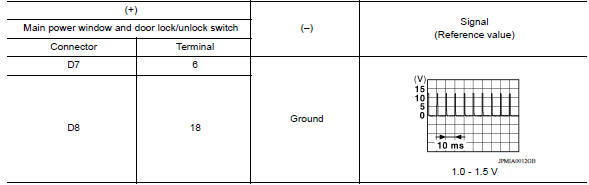
Is the inspection result normal?
YES >> GO TO 3.
NO >> GO TO 2.
2.CHECK DOOR LOCK AND UNLOCK SWITCH CIRCUIT
- Disconnect BCM connector.
- Check continuity between BCM harness connector and main power window and
door lock/unlock switch
harness connector.

- Check continuity between BCM harness connector and ground.

Is the inspection result normal?
YES >> Replace BCM. Refer to BCS "Removal and Installation".
NO >> Repair or replace harness.
3.CHECK DOOR LOCK AND UNLOCK SWITCH GROUND
Check continuity between main power window and door lock/unlock switch
harness connector and ground. 
Is the inspection result normal?
YES >> GO TO 4.
NO >> Repair or replace harness.
4.CHECK DOOR LOCK AND UNLOCK SWITCH
Refer to DLK "Component Inspection".
Is the inspection result normal?
YES >> GO TO 5.
NO >> Replace main power window and door lock/unlock switch. Refer to PWC "Removal and Installation".
5.CHECK INTERMITTENT INCIDENT
Refer to GI "Intermittent Incident".
>> Inspection End.
Component Inspection
1.CHECK MAIN POWER WINDOW AND DOOR LOCK/UNLOCK SWITCH
- Turn ignition switch OFF.
- Disconnect main power window and door lock/unlock switch connector.
- Check continuity between main power window and door lock/unlock switch
terminals.
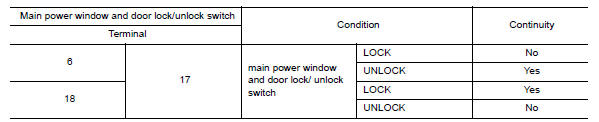
Is the inspection result normal?
YES >> Inspection End
NO >> Replace main power window and door lock/unlock switch. Refer to PWC "Removal and Installation".
 Rear RH
REAR RH : Component Function Check 1.CHECK FUNCTION Select DOOR LOCK of BCM using CONSULT. Select DOOR LOCK in ACTIVE TEST mode. Touch ALL LOCK or ALL UNLK to check that it works normally. ...

Other materials:
Meters and gauges
Type A (if so equipped)
1. Tachometer
2. Speedometer
3. Fuel gauge
4. Odometer
Twin trip odometer
Trip computer
5. Continuously Variable Transmission
(CVT) position indicator (if so equipped)
Automatic Transmission (A/T) position
indicator (if so equipped)
6. Instrument brightness con ...
Basic inspection
Work Procedure
1.INSPECTION START
1. Check service records for any recent
repairs that may indicate a related malfunction, or a current need for
scheduled maintenance.
2. Open engine hood and check the following:
Harness con ...
Categories
- Manuals Home
- Nissan Versa Owners Manual
- Nissan Versa Service Manual
- Video Guides
- Questions & Answers
- External Resources
- Latest Updates
- Most Popular
- Sitemap
- Search the site
- Privacy Policy
- Contact Us

0.0367