
Nissan Versa (N17): Radiator core support upper
RADIATOR CORE SUPPORT UPPER : Removal and Installation
RADIATOR CORE SUPPORT UPPER
Removal
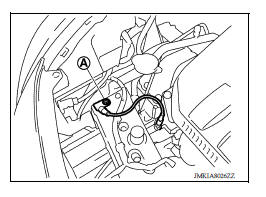
1. Remove ground harness bolt (A).
2. Remove horn. Refer to HRN "Removal and Installation".
3. Remove hood lock assembly and hood lock control cable assembly clip. Refer to DLK "HOOD LOCK : Removal and Installation".
4. Remove crash zone sensor. Refer to SR "Removal and Installation".
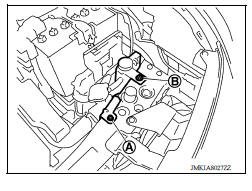
5. Remove radiator cap adapter bracket bolt (A) and radiator reservoir tank bolt (B).
6. Remove radiator upper seal clips.
7. Remove upper clips of radiator side seal (LH/RH).
8. Disconnect all harness clips.
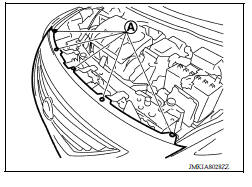
9. Remove front bumper fascia upper side clips (A).
10. Remove radiator core support upper bolts.
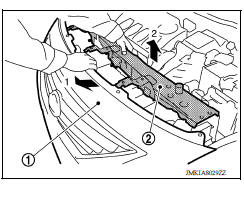
11. Pull back on upper part of front bumper fascia (1) and then remove radiator core support upper (2) by pulling upward.
Installation
Installation is in the reverse order of removal.
 Hood hinge
HOOD HINGE : Removal and Installation REMOVAL Remove hood assembly. Refer to DLK "HOOD ASSEMBLY : Removal and Installation". Remove hood support rod and grommet. Refer to DLK" ...
Radiator core support lower
RADIATOR CORE SUPPORT LOWER : Removal and Installation Removal 1. Remove under cover. Refer to EXT "Removal and Installation". 2. Remove radiator upper seal clips. 3. Remove front bumpe ...
Other materials:
Additional service when replacing
ECM
Description
When replacing ECM, the following procedure must be performed.
PROGRAMMING OPERATION
NOTE:
After replacing with a blank ECM, programming is required to write ECM
information. Be sure to follow the procedure
to perform the programming.
Work Procedure
1.CHECK ECM PART NUMBER
Che ...
U0073 Communication bus a off
DTC Logic
DTC
Trouble diagnosis name
DTC detecting condition
Possible causes
U0073
Control Module Communication
Bus "A" Off
When the ignition switch is ON,
TCM detects a bus-off error
continuously for 2 seconds or
more.
Harness or connector
(CA ...
Categories
- Manuals Home
- Nissan Versa Owners Manual
- Nissan Versa Service Manual
- Video Guides
- Questions & Answers
- External Resources
- Latest Updates
- Most Popular
- Sitemap
- Search the site
- Privacy Policy
- Contact Us

0.0157