
Nissan Versa (N17): Rear window glass
Exploded View
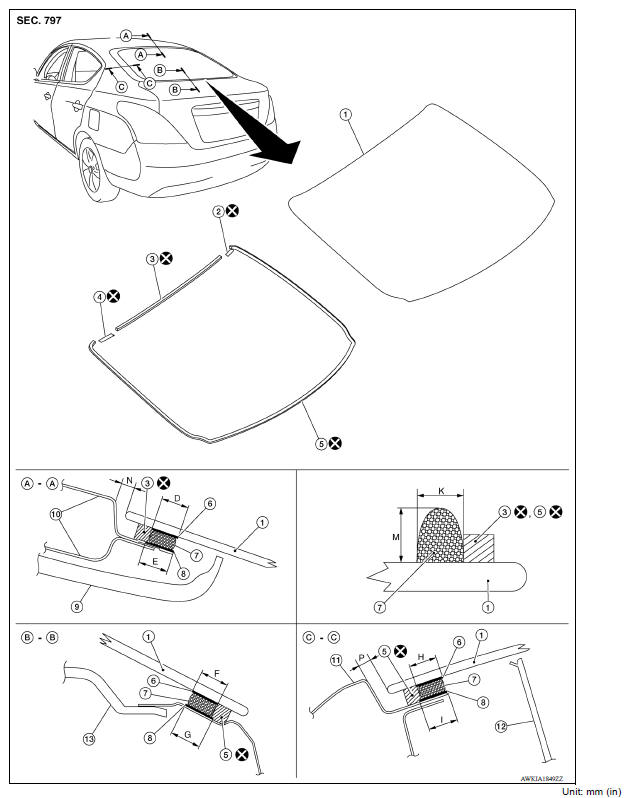
1. Rear window glass 2. Rear window glass holder (RH) 3. Dam sealant rubber (upper) 4. Rear window glass holder (LH) 5. Dam sealant rubber (lower) 6. Glass primer 7. Adhesive 8. Body primer 9. Headlining assembly 10. Roof panel assembly 11. Body side outer panel 12. Rear pillar finisher 13. Rear parcel shelf finisher D. 13.0 (0.51) E. 14.0 (0.55) F. 13.0 (0.51) G. 14.0 (0.55) H. 13.0 (0.51) J. 14.0 (0.55) K. 7.0 (0.28) M. 12.0 (0.47) N. 4.5 (0.18) P. 5.0 (0.20)
Removal and Installation
REMOVAL
1. Remove rear parcel shelf finisher. Refer to INT "Removal and Installation".
2. Remove the harness connectors and grounds for the rear window glass defogger.
3. Remove rear window glass using piano wire or power cutting tool (A) and an inflatable pump bag (B).
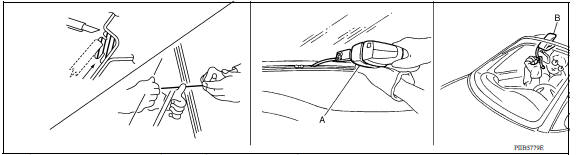
- Mark the body and glass with a matching marks if the rear window glass is reused
- Apply protective tape around the rear window glass to protect the painted surface from damage.
WARNING: Always wear safety glasses and heavy gloves to help prevent injuries.
CAUTION:
- Be careful not to scratch the glass when removing.
- Be careful not to set or stand the glass on its edge. Small chips may develop into cracks.
- Protect the painted surface around the rear window glass from damage.
IINSTALLATION
Installation is in reverse order of removal
- Use a Genuine Nissan Urethane Adhesive Kit (if available) or an equivalent and follow the instructions provided with it.
- The start and finish of the adhesive application shall be located at the middle of the glass bottom to assure watertightness.
- Open a door window while the urethane adhesive is curing. This prevents the glass from being forced out by passenger compartment air pressure when all door windows are closed.
- The molding must be installed securely so that it is in position and leaves no clearance.
- Inform the customer that the vehicle should remain stationary until the urethane adhesive is completely cured (approximately 24 hours). Curing time varies with temperature and humidity.
WARNING:
- Keep heat and open flames away as primers and adhesive are flammable.
- The materials contained in the kit are harmful if swallowed, and may irritate skin and eyes. Avoid contact with the skin and eyes.
- Use in an open, well ventilated location. Avoid breathing the vapors. They may be harmful if inhaled. Move immediately to an area with fresh air if affected by vapor inhalation.
- Driving the vehicle before the urethane adhesive is completely cured may affect the performance of the rear window glass in an accident.
CAUTION:
- Do not use an adhesive that is past its usable term. Shelf life of this product is limited to six months after the date of manufacture. Pay attention to the expiration or manufacture date printed on the box.
- Keep primers and adhesive in a cool, dry place. Ideally, they should be stored in a refrigerator.
- Do not leave primers or adhesive cartridge unattended with their caps open or off.
- The vehicle should not be driven for 24 hours or more or until the urethane adhesive is completely cured. Curing time varies depending on temperature and humidity. The curing time increases under lower temperature and lower humidity.
Inspection
REPAIRING WATER LEAKAGE FOR REAR WINDOW GLASS
Leakage can be repaired without removing the glass.
Determine the extent of leakage if water is leaking between the urethane adhesive material and body or glass.
This can be done by applying water to the rear window glass area while pushing glass outward.
Apply primer (if necessary) and then urethane adhesive to the leakage point to stop the leakage.
 Windshield glass
Exploded View 1. Windshield glass molding 2. Windshield glass 3. Dam sealant rubber (lower) 4. Windshield glass holder (LH) 5. Dam sealant rubber (upper) 6. Inside mirror base 7. Windshield g ...
Front door glass
Exploded View 1. Front door panel 2. Front door lower sash (front) 3. Front door glass run 4. Front door sealing screen 5. Front door power window motor 6. Front door regulator 7. Front door ...
Other materials:
Precaution
Precaution for Supplemental Restraint System
(SRS) "AIR BAG" and "SEAT BELT PRETENSIONER"
The Supplemental Restraint System such as "AIR BAG" and "SEAT BELT
PRETENSIONER", used along
with a front seat belt, helps to reduce the risk or severity of injury to the
driver and f ...
Front stabilizer
Exploded View
1. Stabilizer bar 2. Stabilizer clamp 3. Stabilizer bushing
4. Stabilizer connecting rod 5. Strut assembly 6. Front suspension member
Front
Removal and Installation
REMOVAL
Remove wheel and tire assemblies using power tool. Refer to WT
"Adjustment".
Remove ...
Categories
- Manuals Home
- Nissan Versa Owners Manual
- Nissan Versa Service Manual
- Video Guides
- Questions & Answers
- External Resources
- Latest Updates
- Most Popular
- Sitemap
- Search the site
- Privacy Policy
- Contact Us

0.0102