
Nissan Versa (N17): License plate lamp
Exploded View
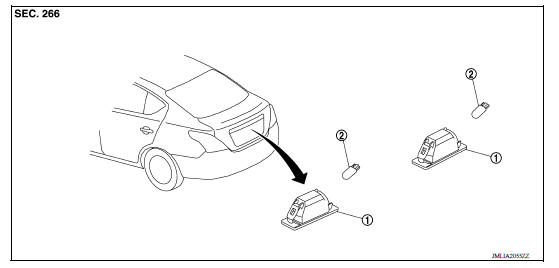
1. License plate lamp 2. License plate lamp bulb
Removal and Installation
REMOVAL
1. While pressing the license plate lamp housing pawl toward the right, pull the housing downward and remove.
2. Rotate the bulb socket counterclockwise and remove.
3. Remove the license plate lamp.
INSTALLATION
Installation is in the reverse order of removal.
Bulb Replacement
WARNING: Do not touch bulb with your hand while it is on or right after being turned off. Burning may result.
CAUTION:
- Disconnect the battery negative terminal or remove power circuit fuse while performing the operation.
- After installing the bulb, install the back cover and the bulb socket securely for watertightness.
- Do not touch the glass surface of the bulb with bare hands or allow oil or grease to get on it to prevent damage to the bulb.
- Do not leave bulb out of lamp reflector for a long time because dust, moisture smoke, etc. may affect the performance of lamp. When replacing bulb, be sure to replace it with new one.
LICENSE PLATE LAMP BULB
Removal
1. Remove the license plate lamp. Refer to EXL "Removal and Installation".
2. Remove the bulb from the socket.
Installation
Installation is in the reverse order of removal.
CAUTION: After installing the bulb, install the bulb socket securely for watertightness.
SERVICE DATA AND SPECIFICATIONS (SDS)
Bulb Specifications
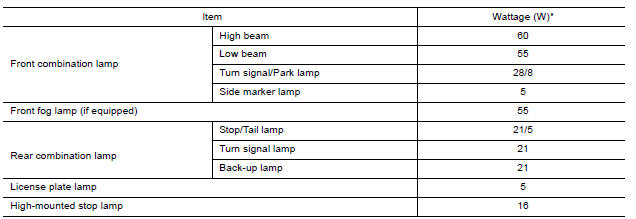
*: Always check with the Parts Department for the latest parts information.
 High-mounted stop lamp
Exploded View Rear Spoiler 1. Rear spoiler 2. High-mounted stop lamp assembly Rear Parcel Shelf 1. Rear parcel shelf finisher 2. High-mounted stop lamp socket 3. High-mounted stop lamp b ...

Other materials:
Consult function
APPLICATION ITEMS
Diagnostic test mode
Function
Work Support
This mode enables a technician to adjust some devices faster and
more accurately.
Self Diagnostic Results
Retrieve DTC from ECU and display diagnostic items.
Data Monitor
Monitor the input ...
P072E Stuck in 3GR
DTC Logic
DTC DETECTION LOGIC
DTC
Trouble diagnosis name
DTC detection condition
Possible causes
P072E
Stuck in Gear 3
The following diagnosis conditions
are met and the detection
conditions continue for 0.5 seconds
or more.- Diagnosis condition
- Shifti ...
Categories
- Manuals Home
- Nissan Versa Owners Manual
- Nissan Versa Service Manual
- Video Guides
- Questions & Answers
- External Resources
- Latest Updates
- Most Popular
- Sitemap
- Search the site
- Privacy Policy
- Contact Us

0.0071