
Nissan Versa (N17): Roof antenna
Exploded View
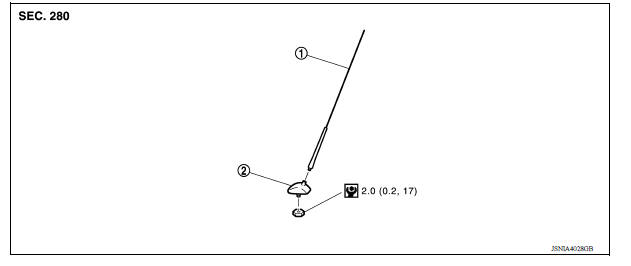
1. Antenna mast 2. Antenna base
Removal and Installation
REMOVAL
1. Remove the headlining. Refer to INT "Removal and Installation".
2. Disconnect the antenna cable.
3. Remove the antenna base nut.
4. Remove the antenna base from the roof panel.
INSTALLATION
Installation is in the reverse order of removal.
CAUTION: Tighten the antenna base nut to specifications.
- If the antenna base nut is less than the specified torque, it will affect the function of the antenna.
- If the antenna base nut is greater than the specified torque, it will damage the roof panel.
ANTENNA FEEDER
Feeder Layout
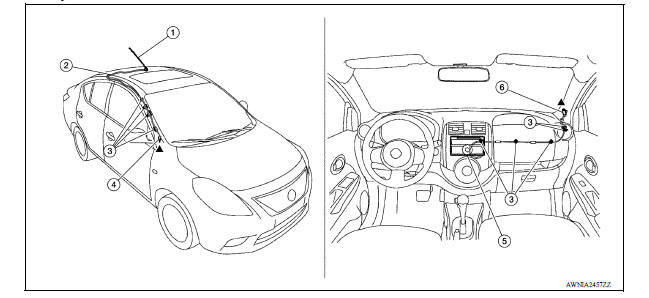
1. Antenna mast 2. Antenna feed 3. Clip 4. Harness connector 5. Audio unit 6. Harness connector
MID AUDIO
 Rear door speaker
Removal and Installation REMOVAL 1. Remove the rear door finisher. Refer to INT "Removal and Installation". 2. Remove the rear door speaker screws (A). 3. Disconnect the harness connecto ...

Other materials:
Child safety
WARNING
Do not allow children to play with the seat
belts. Most seating positions are
equipped with Automatic Locking Retractor
(ALR) mode seat belts. If the seat belt
becomes wrapped around a child's neck
with the ALR mode activated, the child can
be seriously injured or killed if the seat
...
Instrument panel
1. Headlight/turn signal switch/fog light
switch (if so equipped)
2. Driver's supplemental air bag (P. 1-39)
Horn
3. Meters and gauges. Warning and indicator lights
4. Wiper and washer switch
5. Vents
6. Rear window defroster switch
7. Front passenger air bag status light
8. Hazard warn ...
Categories
- Manuals Home
- Nissan Versa Owners Manual
- Nissan Versa Service Manual
- Video Guides
- Questions & Answers
- External Resources
- Latest Updates
- Most Popular
- Sitemap
- Search the site
- Privacy Policy
- Contact Us

0.0179