
Nissan Versa (N17): USB Connector
Removal and Installation
REMOVAL
1. Remove the center console assembly. Refer to IP "Removal and Installation".
2. Release the pawl from the back of the center console to remove the USB harness connector (1) using a suitable tool.
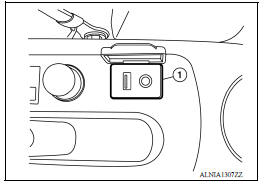
3. Disconnect the harness connector from the USB connector and remove.
INSTALLATION
Installation is in the reverse order of removal.
 Rear door speaker
Removal and Installation REMOVAL 1. Remove the rear door finisher. Refer to INT "Removal and Installation". 2. Remove the rear door speaker screws (A). 3. Disconnect the harness connec ...
Bluetooth control unit
Removal and Installation REMOVAL 1. Remove the trunk floor finisher. 2. Remove the trunk rear finisher. 3. Remove the trunk side finisher (RH) 4. Disconnect the harness connector (A) from Bluetoo ...
Other materials:
Component parts
Component Parts Location
1 BCM (view with instrument panel removed)
2 Remote keyless entry receiver (view
with instrument panel removed)
3 Transmitter
4 Combination meter (with type A) 5 Combination meter (with type B)
Component Description
Component parts
Function
...
Seat belt warning system
Seat Belt Warning System Does Not Function
1.SEAT BELT WARNING LIGHT
Turn ignition switch ON.
Does the seat belt warning lamp come ON?
YES >> GO TO 2
NO >>
Check 10A fuse [No. 3, located in the fuse block (J/B)].
Check seat belt buckle switch LH.
Check harness between combi ...
Categories
- Manuals Home
- Nissan Versa Owners Manual
- Nissan Versa Service Manual
- Video Guides
- Questions & Answers
- External Resources
- Latest Updates
- Most Popular
- Sitemap
- Search the site
- Privacy Policy
- Contact Us

0.008