
Nissan Versa (N17): Bluetooth control unit
Removal and Installation
REMOVAL
1. Remove the trunk floor finisher.
2. Remove the trunk rear finisher.
3. Remove the trunk side finisher (RH)
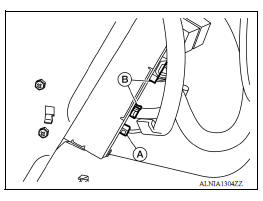
4. Disconnect the harness connector (A) from Bluetooth antenna.
5. Disconnect the harness connector (B) from Bluetooth control unit.
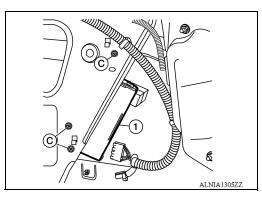
6. Remove the Bluetooth control unit screws (C) and the Bluetooth control unit (1).
7. Remove the Bluetooth control unit (1).
INSTALLATION
Installation is in the reverse order of removal.
 USB Connector
Removal and Installation REMOVAL 1. Remove the center console assembly. Refer to IP "Removal and Installation". 2. Release the pawl from the back of the center console to remove the ...
Steering audio control switch
Removal and Installation 1. Steering wheel 2. Steering wheel audio control switches 3. Driver air bag module 4. Steering wheel rear finisher REMOVAL 1. Remove the steering wheel. Refer to ...
Other materials:
Air cleaner and air duct
Exploded View
1. Clamp 2. PCV hose 3. Clamp
4. Mount rubber 5. Air duct (inlet) 6. Air cleaner body
7. Grommet 8. Air cleaner filter 9. Air cleaner cover
10. Mass air flow sensor 11. Air duct 12. Clamp
Removal and Installation
REMOVAL
NOTE:
Mass air flow sensor is removable as an assemb ...
EPS System
EPS SYSTEM : System Description
EPS control unit performs an arithmetical operation on data, such as
steering wheel turning force (sensor
signal) from the torque sensor, vehicle speed signal, etc. Then it generates
an optimum assist torque signal
to the EPS motor according to the drivi ...
Categories
- Manuals Home
- Nissan Versa Owners Manual
- Nissan Versa Service Manual
- Video Guides
- Questions & Answers
- External Resources
- Latest Updates
- Most Popular
- Sitemap
- Search the site
- Privacy Policy
- Contact Us

0.0061