
Nissan Versa (N17): Steering audio control switch
Removal and Installation
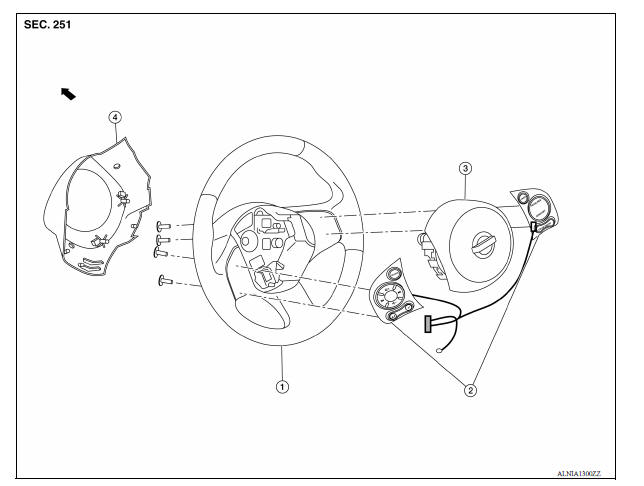
1. Steering wheel 2. Steering wheel audio control switches 3. Driver air bag module 4. Steering wheel rear finisher
REMOVAL
1. Remove the steering wheel. Refer to ST "Removal and Installation".
2. Remove the steering wheel rear finisher.
3. Remove the steering wheel audio control switches screws.
4. Remove the steering wheel audio control switches from the steering wheel.
INSTALLATION
Installation is in the reverse order of removal.
 Bluetooth control unit
Removal and Installation REMOVAL 1. Remove the trunk floor finisher. 2. Remove the trunk rear finisher. 3. Remove the trunk side finisher (RH) 4. Disconnect the harness connector (A) from Bluetoo ...
Bluetooth antenna
Removal and Installation REMOVAL 1. Remove the rear seat cushion assembly. Refer to SE "Removal and Installation - Seat Cushion Assembly". 2. Remove the rear step plate (RH). 3. Remov ...
Other materials:
Towing a trailer
Flat towing
Do not tow a trailer with your vehicle.
Towing your vehicle with all four wheels on the
ground is sometimes called flat towing. This
method is sometimes used when towing a vehicle
behind a recreational vehicle, such as a motor
home.
CAUTION
Failure to follow these guidelines c ...
P0717 Input speed sensor A
DTC Logic
DTC DETECTION LOGIC
DTC
Trouble diagnosis name
DTC detection condition
Possible causes
P0717
Input/Turbine Speed Sensor "A"
Circuit No Signal
Under the following diagnosis
conditions, the input speed sensor
value is less than 600 rpm
continuousl ...
Categories
- Manuals Home
- Nissan Versa Owners Manual
- Nissan Versa Service Manual
- Video Guides
- Questions & Answers
- External Resources
- Latest Updates
- Most Popular
- Sitemap
- Search the site
- Privacy Policy
- Contact Us

0.0235