
Nissan Versa (N17): Rear spoiler
Exploded View
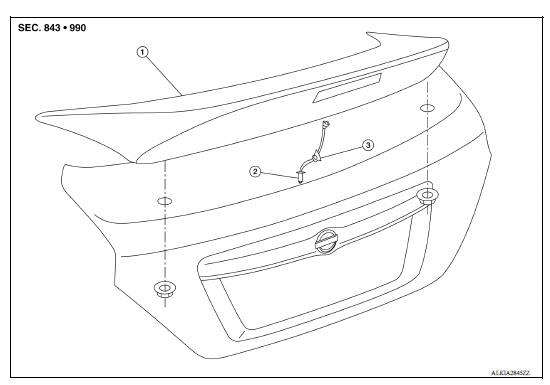
1. Rear spoiler 2. High-mounted stop lamp harness connector 3. Harness grommet
Removal and Installation
Removal
1. Remove trunk lid finisher (if equipped). Refer to EXT "Removal and Installation".
2. Disconnect high-mounted stop lamp harness connector (1).
3. Remove the rear spoiler nuts.
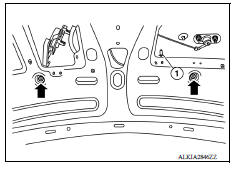
4. Using a suitable heating tool may also be necessary to evenly heat the rear spoiler contact surface while releasing the tape with a suitable tool.
5. Loosen the harness grommet and gently lift the rear spoiler upward off of trunk lid.
Installation
Installation is in the reverse order of removal.
NOTE:
- Before installing rear spoiler, clean the surface where it will be mounted with isopropyl alcohol or equivalent to degrease the surface.
- Before installing, be sure there are no gaps or waves in the adhesive-backed foam tape where the surfaces meet.
- During installation, be sure harness grommet of high-mounted stop lamp is fully seated into trunk lid opening prior to final rear spoiler placement.
 Door parting seal
Exploded View 1. Door parting seal 2. Double-sided tape [t: 1.6 mm (0.065 in)] Clip Removal and Installation REMOVAL 1. Open front door and rear door. 2. Release door parting seal clips usi ...
Precautions
Precaution for Supplemental Restraint System (SRS) "AIR BAG" and "SEAT BELT PRE-TENSIONER" The Supplemental Restraint System such as "AIR BAG" and "SEAT BELT PRE-TENSIONER", us ...
Other materials:
Main power supply and ground circuit
Diagnosis Procedure
1.CHECK TCM POWER CIRCUIT 1
Turn the ignition switch OFF.
Disconnect the TCM connector.
Check the voltage between the TCM harness connector terminals and
ground.
Is the inspection result normal?
YES >> GO TO 2.
NO >> GO TO 4.
2.CHECK TCM POWER ...
Slip indicator lamp
Component Function Check
1.CHECK SLIP INDICATOR LAMP FUNCTION
Check that slip indicator lamp in combination meter turns ON for
approximately 2 seconds after ignition switch
is turned ON.
Is the inspection result normal?
YES >> Inspection End.
NO >> Proceed to diagnosis procedure. ...
Categories
- Manuals Home
- Nissan Versa Owners Manual
- Nissan Versa Service Manual
- Video Guides
- Questions & Answers
- External Resources
- Latest Updates
- Most Popular
- Sitemap
- Search the site
- Privacy Policy
- Contact Us

0.0102