
Nissan Versa (N17): B2601 Shift position
DTC Logic
DTC DETECTION LOGIC
NOTE:
- If DTC B2601 is displayed with DTC U1000, first perform the trouble diagnosis for DTC U1000. Refer to BCS "DTC Logic".
- If DTC B2601 is displayed with DTC U1010, first perform the trouble
diagnosis for DTC U1010. Refer to
BCS "DTC Logic".
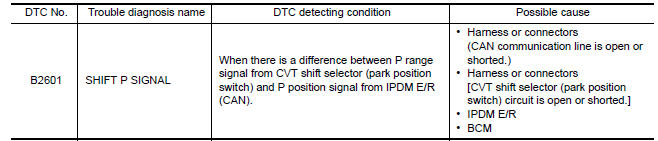
DTC CONFIRMATION PROCEDURE
1.PERFORM DTC CONFIRMATION PROCEDURE
1. Shift the selector lever to the P position.
2. Turn ignition switch ON and wait 2 seconds or more.
3. Shift the selector lever to any position other than P and wait 2 seconds or more.
4. Check DTC in Self Diagnostic Result mode of BCM using CONSULT.
Is DTC detected?
YES >> Go to SEC "Diagnosis Procedure".
NO >> Inspection End.
Diagnosis Procedure
Regarding Wiring Diagram information, refer to SEC "Wiring Diagram".
1.CHECK CVT SHIFT SELECTOR CIRCUIT (BCM)
1. Turn ignition switch OFF.
2. Disconnect CVT shift selector (park position switch) connector.
3. Disconnect BCM connector.
4. Check continuity between CVT shift selector (park position switch) harness
connector and BCM harness
connector. 
5. Check continuity between CVT shift selector (park position switch) harness
connector and ground. 
Is the inspection result normal?
YES >> GO TO 2.
NO >> Repair or replace harness.
2.CHECK CVT SHIFT SELECTOR CIRCUIT (IPDM E/R)
1. Disconnect IPDM E/R connector.
2. Check continuity between CVT shift selector (park position switch) harness
connector and IPDM E/R harness
connector. 
Is the inspection result normal?
YES >> GO TO 3.
NO >> Repair or replace harness.
3.REPLACE BCM
1. Replace BCM. Refer to BCS "Removal and Installation".
2. Perform initialization of BCM and registration of all Intelligent Keys using CONSULT.
3. Perform DTC CONFIRMATION PROCEDURE for DTC B2601. Refer to SEC "DTC Logic".
Is DTC B2601 detected again?
YES >> Replace IPDM E/R. Refer to PCS "Removal and Installation".
NO >> Inspection End.
 B2557 Vehicle speed
Other materials:
P0712 Transmission fluid temperature
sensor A
DTC Logic
DTC DETECTION LOGIC
DTC
Trouble diagnosis name
DTC detection condition
Possible causes
P0712
Transmission Fluid Temperature
Sensor A Circuit Low
The CVT fluid temperature identified by the
TCM is 180C (356F) or more continuously
for 5 seconds or ...
Front drive shaft
Exploded View
1. Drive shaft 2. Cotter pin A. Apply Molykote M77
Removal and Installation
REMOVAL
Remove the wheel and tire assembly using power tool. Refer to WT
"Adjustment".
Remove wheel sensor and sensor harness. Refer to BRC "FRONT WHEEL SENSOR
: Removal and
...
Categories
- Manuals Home
- Nissan Versa Owners Manual
- Nissan Versa Service Manual
- Video Guides
- Questions & Answers
- External Resources
- Latest Updates
- Most Popular
- Sitemap
- Search the site
- Privacy Policy
- Contact Us

0.0142