
Nissan Versa (N17): B210B Starter control relay
DTC Logic
DTC DETECTION LOGIC
NOTE:
If DTC B210B is displayed with DTC U1000, first perform the trouble diagnosis
for DTC U1000. Refer to BCS "DTC Logic".
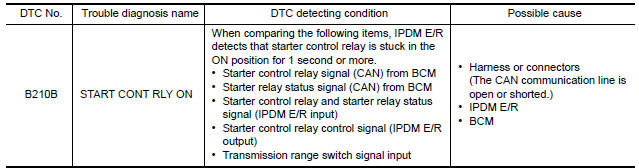
DTC CONFIRMATION PROCEDURE
1.PERFORM DTC CONFIRMATION PROCEDURE
1. Press push-button ignition switch under the following conditions to start engine, and wait 1 second or more.
- Selector lever: In the P position
- Brake pedal: Not depressed
2. Check DTC in Self Diagnostic Result mode of IPDM E/R using CONSULT.
Is DTC detected?
YES >> Go to SEC "Diagnosis Procedure".
NO >> Inspection End.
Diagnosis Procedure
1.CHECK DTC FOR BCM
Check DTC in Self Diagnostic Result mode of BCM using CONSULT.
Is DTC detected?
YES >> Perform the trouble diagnosis related to the detected DTC. Refer to BCS "DTC Index".
NO >> GO TO 2.
2.INSPECTION START
1. Turn ignition switch ON.
2. Select Self Diagnostic Result mode of IPDM E/R using CONSULT.
3. Touch "ERASE".
4. Perform DTC CONFIRMATION PROCEDURE for DTC B210B. Refer to SEC "DTC Logic".
Is DTC detected?
YES >> GO TO 3.
NO >> Inspection End.
3.REPLACE BCM
1. Replace BCM. Refer to BCS "Removal and Installation".
2. Perform initialization of BCM and registration of all Intelligent Keys using CONSULT.
3. Perform DTC CONFIRMATION PROCEDURE for DTC B210B. Refer to SEC "DTC Logic".
Is the inspection result normal?
YES >> Inspection End.
NO >> Replace IPDM E/R. Refer to PCS "Removal and Installation".
 B26FC Key registration
Other materials:
Low tire pressure warning lamp
Component Function Check
1.CHECK THE ILLUMINATION OF THE LOW TIRE PRESSURE WARNING LAMP
Check that the low tire pressure warning lamp is turned OFF after
illuminating for approximately 1 second,
when the ignition switch is turned ON.
Is the inspection result normal?
YES >> Inspection En ...
Adjustment of steering angle sensor
neutral position
Description
Refer to the table below to determine if adjustment of steering angle sensor
neutral position is required.
Work Procedure
ADJUSTMENT OF STEERING ANGLE SENSOR NEUTRAL POSITION
CAUTION:
To adjust neutral position of steering angle sensor, make sure to use CONSULT.
(Adjustme ...
Categories
- Manuals Home
- Nissan Versa Owners Manual
- Nissan Versa Service Manual
- Video Guides
- Questions & Answers
- External Resources
- Latest Updates
- Most Popular
- Sitemap
- Search the site
- Privacy Policy
- Contact Us

0.0068