
Nissan Versa (N17): Outside key antenna
Outside handle
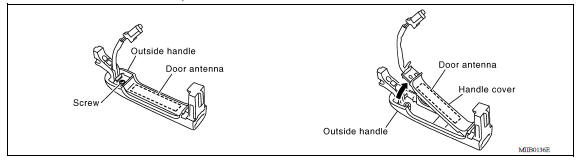
OUTSIDE HANDLE : Removal and Installation
REMOVAL
1. Remove the outside handle. Refer to DLK "OUTSIDE HANDLE : Removal and Installation".
2. Remove the handle cover screw, handle cover and door antenna.
INSTALLATION
Installation is in the reverse order of removal.
Rear bumper
REAR BUMPER : Removal and Installation
REMOVAL
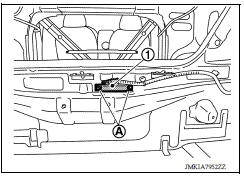
1. Remove the rear bumper fascia. Refer to EXT "Removal and Installation".
2. Remove clips (A) and the outside key antenna (rear bumper) (1).
INSTALLATION
Installation is in the reverse order of removal.
INTELLIGENT KEY WARNING BUZZER
Removal and Installation
REMOVAL
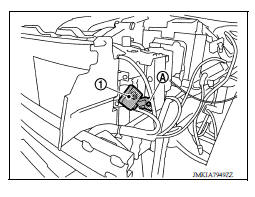
Remove bolt (A) and the Intelligent Key warning buzzer (1).
INSTALLATION
Installation is in the reverse order of removal.
REMOTE KEYLESS ENTRY RECEIVER
Removal and Installation
REMOVAL
1. Remove the glove box. Refer to IP "Removal and Installation".
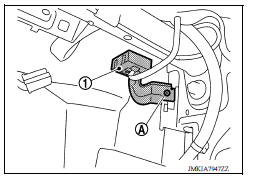
2. Remove the remote keyless entry receiver bolt (A).
3. Disconnect the harness connector from remote keyless entry receiver and remove remote keyless entry receiver (1)
INSTALLATION
Installation is in the reverse order of removal.
 Inside key antenna
Intelligent key battery
Removal and Installation 1. Release the lock knob at the back of the Intelligent Key and remove the mechanical key. 2. Insert a suitable tool (A) wrapped with a cloth into the slit of the corner ...
Other materials:
Steering wheel
Tilt operation
Push the lock lever 1 down and adjust the
steering wheel up or down 2 to the desired
position.
Pull the lock lever 1 up to lock the steering
wheel in place.
WARNING
Do not adjust the steering wheel while
driving. You could lose control of your
vehicle and cause an accid ...
Diagnosis and repair workflow
Work Flow
OVERALL SEQUENCE
DETAILED FLOW
1.GET INFORMATION FOR SYMPTOM
Get the detailed information from the customer about the symptom (the
condition and the environment when
the incident/malfunction occurred).
>> GO TO 2
2.CHECK DTC
Check DTC.
Perform the following procedu ...
Categories
- Manuals Home
- Nissan Versa Owners Manual
- Nissan Versa Service Manual
- Video Guides
- Questions & Answers
- External Resources
- Latest Updates
- Most Popular
- Sitemap
- Search the site
- Privacy Policy
- Contact Us

0.0133