
Nissan Versa (N17): Turn signal and hazard warning lamp system
TURN SIGNAL AND HAZARD WARNING LAMP SYSTEM : System Diagram
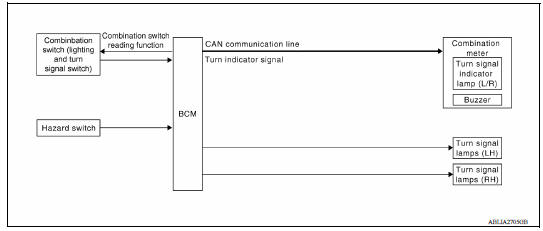
TURN SIGNAL AND HAZARD WARNING LAMP SYSTEM : System Description
TURN SIGNAL OPERATION
When the turn signal switch is in LH or RH position with the ignition switch in ON position, the BCM detects the TURN RH or TURN LH ON request. The BCM outputs the flasher output signal to the respective turn signal lamp. The BCM sends a turn indicator signal ON request through the CAN communication lines to the combination meter. The combination meter then activates the appropriate turn signal indicator and audible buzzer.
HAZARD LAMP OPERATION
When the hazard switch is in ON position, the BCM detects the hazard switch signal ON. The BCM outputs the flasher output signal (right and left). The BCM sends a hazard indicator signal ON request through the CAN communication lines to the combination meter. The combination meter then activates the hazard indicator and audible buzzer.
REMOTE KEYLESS ENTRY OPERATION
The remote keyless entry receiver transmits hazard lamp signal to BCM, then BCM controls hazard lamps.
Refer to DLK "REMOTE KEYLESS ENTRY SYSTEM : System Description".
 Front fog lamp system
FRONT FOG LAMP SYSTEM : System Diagram FRONT FOG LAMP SYSTEM : System Description FRONT FOG LAMP OPERATION When the combination switch (lighting and turn signal switch) is in front fog lamp O ...
Parking, license plate and tail lamp
system
PARKING, LICENSE PLATE AND TAIL LAMP SYSTEM : System Diagram PARKING, LICENSE PLATE AND TAIL LAMP SYSTEM : System Description PARKING, LICENSE PLATE AND TAIL LAMPS OPERATION When the combina ...
Other materials:
Engine control system
ENGINE CONTROL SYSTEM : Component Parts Location
1. Mass air flow sensor
(with intake air temperature sensor)
2. Electric throttle control actuator
(with built in throttle position sensor
and throttle control motor)
3. EVAP canister purge volume control
solenoid valve
4. Cooling fan mot ...
Idle air volume learning
Description
Idle Air Volume Learning is a function of ECM to learn the idle air volume
that keeps each engine idle speed
within the specific range. It must be performed under any of the following
conditions:
Each time electric throttle control actuator or ECM is replaced.
Idle speed or ...
Categories
- Manuals Home
- Nissan Versa Owners Manual
- Nissan Versa Service Manual
- Video Guides
- Questions & Answers
- External Resources
- Latest Updates
- Most Popular
- Sitemap
- Search the site
- Privacy Policy
- Contact Us

0.0109