
Nissan Versa (N17): USB Connector
Removal and Installation
REMOVAL
1. Remove the center console assembly. Refer to IP "Removal and Installation".
2. Release the pawl from the back of the center console to remove the USB harness connector (1) using a suitable tool.
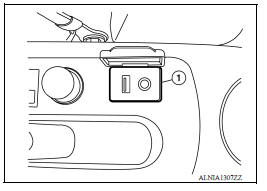
3. Disconnect the harness connector from the USB connector and remove.
INSTALLATION
Installation is in the reverse order of removal.
 AV Control unit
Removal and Installation REMOVAL 1. Remove cluster lid C. Refer to IP "Removal and Installation". 2. Remove the audio unit screws (A). 3. Pull the audio unit (1) out. 4. Disconnect the ...
Front door speaker
Removal and Installation REMOVAL 1. Remove the front door finisher. Refer to INT "Removal and Installation". 2. Remove the front door speaker screws (A). 3. Disconnect the harness connec ...
Other materials:
Cylinder block
Exploded View
1. Crankshaft position sensor cover 2. Crankshaft position sensor (POS) 3.
Oring
4. Drain plug 5. Cylinder block 6. Oil level gauge
7. Oil level gauge guide 8. Oring 9. Knock sensor 10. Oil temperature sensor
11. Oil pressure sensor 12. Oil jet
13. Top ring 14. Second ring ...
Spiral cable
Exploded View
1. Steering column upper cover 2. Combination switch 3. Spiral cable
4. Steering wheel 5. Driver air bag module 6. Steering lock escutcheon
7. Steering column lower cover 8. Steering column assembly
Pawl
Removal and Installation
WARNING:
Always observe the following items f ...
Categories
- Manuals Home
- Nissan Versa Owners Manual
- Nissan Versa Service Manual
- Video Guides
- Questions & Answers
- External Resources
- Latest Updates
- Most Popular
- Sitemap
- Search the site
- Privacy Policy
- Contact Us

0.0062