
Nissan Versa (N17): Center console assembly
Exploded View
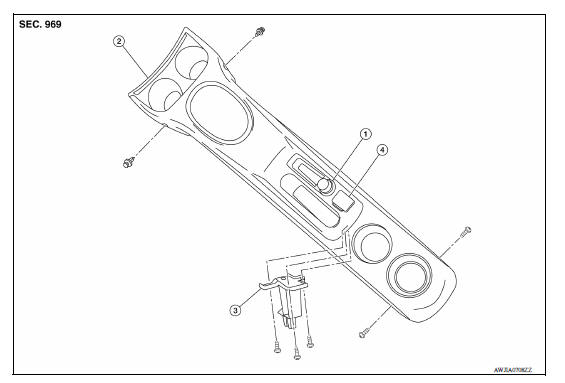
1. Power socket 2. Center console assembly 3. Center console support 4. USB port and auxiliary jack
Disassembly and Assembly
DISASSEMBLY
- Remove the center console assembly. Refer to IP "Removal and Installation".
- Remove center console support screws and center console support.
- Remove power socket. Refer to PWO "Removal and Installation".
- Remove USB connector and auxiliary jack (if equipped). Refer to AV "Removal and Installation" (DISPLAY AUDIO) or AV "Removal and Installation" (NAVIGATION).
ASSEMBLY
Assembly is in the reverse order of disassembly.
 Center console lower
Removal and Installation REMOVAL Remove center console assembly. Refer to IP "Removal and Installation". Remove center console lower. a. Place front seats in a full rearward positi ...

Other materials:
PLUG
Description
Replace the O-ring if oil leakage or exudes from the plug.
Exploded View
1. Plug 2. O-ring 3. O-ring
4. Plug Genuine NISSAN CVT Fluid
NS-3
Removal and Installation
REMOVAL
Remove the plugs and O-rings.
INSTALLATION
Installation is in the reverse order of removal.
CAUT ...
Performance test
Inspection
INSPECTION PROCEDURE
Connect recovery/recycling/recharging equipment (for HFC-134a) or
manifold gauge.
Start the engine, and set to the following condition.
Test condition &n ...
Categories
- Manuals Home
- Nissan Versa Owners Manual
- Nissan Versa Service Manual
- Video Guides
- Questions & Answers
- External Resources
- Latest Updates
- Most Popular
- Sitemap
- Search the site
- Privacy Policy
- Contact Us

0.0079