
Nissan Versa (N17): B210D Starter relay
DTC Logic
DTC DETECTION LOGIC
NOTE: If DTC B210D is displayed with DTC U1000, first perform the trouble
diagnosis for DTC U1000. Refer to BCS "DTC Logic". 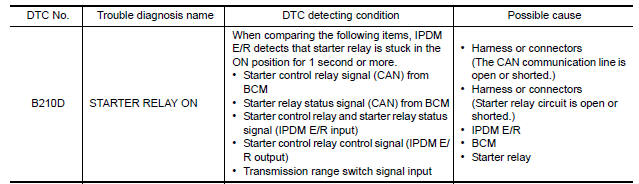
DTC CONFIRMATION PROCEDURE
1.PERFORM DTC CONFIRMATION PROCEDURE
1. Press push-button ignition switch under the following conditions to start engine, and wait 1 second or more.
- Selector lever: In the P position
- Brake pedal: Not depressed
2. Check DTC in Self Diagnostic Result mode of IPDM E/R using CONSULT.
Is DTC detected?
YES >> Go to SEC"Diagnosis Procedure".
NO >> Inspection End
Diagnosis Procedure
Regarding Wiring Diagram information, refer to SEC "Wiring Diagram".
1.CHECK STARTER RELAY POWER SUPPLY CIRCUIT
1. Turn ignition switch ON.
2. Check voltage between BCM harness connector and ground.
Is the inspection result normal?
YES >> GO TO 3.
NO >> GO TO 2.
2.CHECK STARTER RELAY CIRCUIT
1. Turn ignition switch OFF.
2. Disconnect starter relay.
3. Disconnect BCM connector.
4. Check continuity between starter relay harness connector and BCM harness
connector.
5. Check continuity between IPDM E/R harness connector and ground. 
Is the inspection result normal?
YES >> Replace IPDM E/R. Refer to PCS "Removal and Installation".
NO >> Repair or replace harness.
3.CHECK STARTER RELAY
Refer to SEC "Component Inspection".
Is the inspection result normal?
YES >> GO TO 4.
NO >> Replace starter relay.
4.REPLACE BCM
1. Replace BCM. Refer to BCS "Removal and Installation".
2. Perform initialization of BCM and registration of all Intelligent keys using CONSULT.
3. Perform DTC CONFIRMATION PROCEDURE for DTC B210D. Refer to SEC "DTC Logic".
Is the inspection result normal?
YES >> Inspection End.
NO >> Replace IPDM E/R. Refer to PCS "Removal and Installation".
Component Inspection
1.CHECK STARTER RELAY
1. Turn ignition switch OFF.
2. Disconnect starter relay.
3. Check continuity between starter relay terminals. 
Is the inspection result normal?
YES >> Inspection End.
NO >> Replace starter relay.
 B210C Starter control relay
Other materials:
Cold weather driving
Freeing a frozen door lock
To prevent a door lock from freezing, apply deicer
through the key hole. If the lock becomes
frozen, heat the key before inserting it into the key
hole, or use the remote keyless entry key fob or
the NISSAN Intelligent Key.
Antifreeze
In the winter when it is antic ...
Clutch piping
Exploded View
1. CSC (Concentric Slave Cylinder) 2. Clutch tube 3. Clutch damper
4. Bracket 5. Master cylinder
Hydraulic Layout
1. Clutch tube 2. Lock pin 3. CSC (concentric slave cylinder)
4. Clutch damper 5. Master cylinder 6. Clutch pedal
Removal and Installation
CAUTION:
Do not ...
Categories
- Manuals Home
- Nissan Versa Owners Manual
- Nissan Versa Service Manual
- Video Guides
- Questions & Answers
- External Resources
- Latest Updates
- Most Popular
- Sitemap
- Search the site
- Privacy Policy
- Contact Us

0.0063