
Nissan Versa (N17): B210C Starter control relay
DTC Logic
DTC DETECTION LOGIC
NOTE:
- If DTC B210C is displayed with DTC U1000, first perform the trouble diagnosis for DTC U1000. Refer to BCS "DTC Logic".
- When IPDM E/R power supply voltage is low (Approx. 7 - 8 V for about
1 second), the DTC B210C may be
detected.
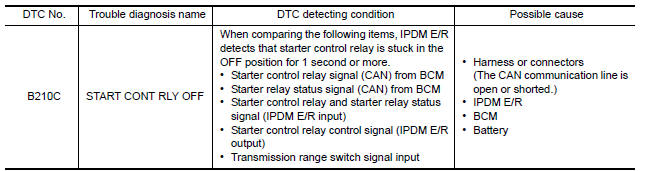
DTC CONFIRMATION PROCEDURE
1.PERFORM DTC CONFIRMATION PROCEDURE
1. Press push-button ignition switch under the following conditions to start engine, and wait 1 second or more.
Selector lever: In the P position
Brake pedal: Not depressed
2. Check DTC in Self Diagnostic Result mode of IPDM E/R using CONSULT.
Is DTC detected?
YES >> Go to SEC "Diagnosis Procedure".
NO >> Inspection End.
Diagnosis Procedure
1.CHECK DTC FOR BCM
Check DTC in Self Diagnostic Result mode of BCM using CONSULT.
Is DTC detected?
YES >> Perform the trouble diagnosis related to the detected DTC. Refer to BCS "DTC Index".
NO >> GO TO 2.
2.INSPECTION START
1. Turn ignition switch ON.
2. Select Self Diagnostic Result mode of IPDM E/R using CONSULT.
3. Touch "ERASE".
4. Perform DTC CONFIRMATION PROCEDURE for DTC B210C. Refer to SEC "DTC Logic".
Is DTC detected?
YES >> GO TO 3.
NO >> Inspection End.
3.REPLACE BCM
1. Replace BCM. Refer to BCS "Removal and Installation".
2. Perform initialization of BCM and registration of all Intelligent Keys using CONSULT.
3. Perform DTC CONFIRMATION PROCEDURE for DTC B210C. Refer to SEC "DTC Logic".
Is the inspection result normal?
YES >> Inspection End.
NO >> Replace IPDM E/R. Refer to PCS "Removal and Installation".
 B210B Starter control relay

Other materials:
Windows
Power windows (if so equipped)
WARNING
Make sure that all passengers have
their hands, etc. inside the vehicle while
it is in motion and before closing the
windows. Use the window lock switch to
prevent unexpected use of the power
windows
To help avoid risk of injury or death
thr ...
Preparation
Special Service Tools
The actual shapes of KentMoore tools may differ from those of special
service tools illustrated here.
Tool number
(KentMoore No.)
Tool name
Description
KV10111100
(J37228)
Seal cutter
Removing oil pan (lower and upper) etc.
...
Categories
- Manuals Home
- Nissan Versa Owners Manual
- Nissan Versa Service Manual
- Video Guides
- Questions & Answers
- External Resources
- Latest Updates
- Most Popular
- Sitemap
- Search the site
- Privacy Policy
- Contact Us

0.0088